
Goal: native install of phpLDAPadmin v2 (2.3.5) under /opt/phpLDAPadmin, served by Nginx + PHP-FPM 8.4, connecting to LDAP/LDAPS. Node is only needed to build assets; runtime is PHP only.
TL;DR
- Native prerequisites: PHP 8.4 with
ldap,xml/DOM,mbstring,zip; plus Nginx, Git, Composer; Node only to build assets. - Get the app: Checkout phpLDAPadmin v2.3.5 to
/opt/phpLDAPadmin. - Build once: Use Node to compile assets; Composer to install PHP deps.
- Configure: Generate
APP_KEY; set.envwithAPP_DEBUG=false,LDAP_CONNECTION,LDAP_HOST,LDAP_PORT,LDAP_BASE_DN,LDAP_USERNAME,LDAP_PASSWORD, andLDAP_LOGIN_ATTR=uidif logging in with a uid. - Web server: Serve the
/publicfolder via Nginx; point PHP to php-fpm 8.4 (socket). - Permissions: Only
storage/andbootstrap/cacheare writable by the web user. - Restart: Reload Nginx; restart php-fpm to pick up extensions.
- Login: Open the site and sign in with your directory credentials (e.g., non-rootDN admin, see below).
Directory used in examples: OpenDJ / 389-DS style directory. Commands and LDIFs assume DS/OpenDJ semantics. The general PLA steps are generic, but ACL/ACI examples are DS/OpenDJ-specific.
Prerequisites
- Ubuntu 24.04 with sudo
- DNS/host entry for the site (e.g.,
pla.maksonlee.com) - LDAP server (examples assume LDAPS
ldap.maksonlee.com:636)
- Install PHP 8.4 + extensions and Nginx
sudo apt update
sudo apt install -y software-properties-common
sudo LC_ALL=C.UTF-8 add-apt-repository ppa:ondrej/php -y
sudo apt update

sudo apt install php8.4 php8.4-cli php8.4-fpm php8.4-xml php8.4-ldap php8.4-mbstring php8.4-zip unzip nginx- Composer + Node (Node is build-time only)
Composer:
php -r "copy('https://getcomposer.org/installer', 'composer-setup.php');"
php composer-setup.php
php -r "unlink('composer-setup.php');"
sudo mv composer.phar /usr/local/bin/composerNode (for building front-end assets):
curl -o- https://raw.githubusercontent.com/nvm-sh/nvm/v0.40.3/install.sh | bash
source ~/.bashrc
nvm install node- Fetch phpLDAPadmin v2.3.5 and build
git clone https://github.com/leenooks/phpLDAPadmin.git
sudo mv phpLDAPadmin /opt/
cd /opt/phpLDAPadmin
git checkout 2.3.5On Ubuntu 24.04 with phpLDAPadmin v2.3.5, the Node build may fail with a missing libatomic.so.1 error. Install libatomic1 before running npm i:
# Required for the Node build on Ubuntu 24.04
sudo apt install -y libatomic1

# Build assets
npm i
npm run prod

# PHP deps
composer i --no-dev- Create a non-rootDN admin (recommended)
This section is OpenDJ / 389-DS specific. The LDIF and ACI syntax, plus the ds-privilege-name attribute, are for OpenDJ-style directories.
Avoid logging in as cn=Directory Manager. Use a dedicated service account with proper rights.
Create the entry:
dn: uid=pla,ou=system,dc=maksonlee,dc=com
objectClass: top
objectClass: person
objectClass: organizationalPerson
objectClass: inetOrgPerson
uid: pla
cn: PLA
sn: PLA
displayName: PLA
employeeType: active
mail: pla@maksonlee.com
userPassword: {SSHA}REPLACE_WITH_HASHGrant rights:
dn: ou=people,dc=maksonlee,dc=com
changetype: modify
add: aci
aci: (target="ldap:///ou=people,dc=maksonlee,dc=com")
 (targetscope="subtree")
 (targetattr != "userPassword")
 (version 3.0; acl "PLA admin write";
  allow (add,write,delete,read,search,compare)
  userdn="ldap:///uid=pla,ou=system,dc=maksonlee,dc=com";)
-
add: aci
aci: (target="ldap:///ou=people,dc=maksonlee,dc=com")
 (targetscope="subtree")
 (targetattr="userPassword")
 (version 3.0; acl "PLA admin reset password";
  allow (write)
userdn="ldap:///uid=pla,ou=system,dc=maksonlee,dc=com";)Grant the password-reset privilege:
dn: uid=pla,ou=system,dc=maksonlee,dc=com
changetype: modify
add: ds-privilege-name
ds-privilege-name: password-reset- Application key and
.env
cp .env.example .env
./artisan key:generateEdit .env (adjust to your environment):
APP_NAME=Laravel
APP_ENV=production
APP_KEY=***set by artisan key:generate***
APP_DEBUG=false

LOG_CHANNEL=daily

CACHE_DRIVER=file
QUEUE_CONNECTION=sync
SESSION_DRIVER=file
SESSION_LIFETIME=120

LDAP_CONNECTION=ldaps
LDAP_HOST=ldap.maksonlee.com
LDAP_PORT=636
LDAP_USERNAME=uid=pla,ou=system,dc=maksonlee,dc=com
LDAP_PASSWORD=REPLACE_WITH_PASSWORD
LDAP_CACHE=false
LDAP_ALERT_ROOTDN=true

LDAP_BASE_DN=dc=maksonlee,dc=com
LDAP_LOGIN_ATTR=uid
LDAP_LOGIN_OBJECTCLASS=inetOrgPerson- Nginx vhost (PHP-FPM 8.4)
File: /etc/nginx/sites-available/phpldapadmin
server {
    listen 80;
    server_name pla.maksonlee.com;   # ← change this

    root /opt/phpLDAPadmin/public;      # ← your PLA path
    index index.php index.html;

    access_log /var/log/nginx/pla_access.log;
    error_log  /var/log/nginx/pla_error.log;

    location / {
        try_files $uri $uri/ /index.php?$query_string;
    }

    # PHP via PHP-FPM 8.4
    location ~ \.php$ {
        include snippets/fastcgi-php.conf;
        fastcgi_pass unix:/run/php/php8.4-fpm.sock;
    }

    location ~ /\. { deny all; }
    location ~* \.env(?:\.local)?$ { deny all; }
    location ~* /(composer\.(?:json|lock)|package(?:-lock)?\.json|webpack\.mix\.js|vite(?:\.config|\.manifest)?\.json|phpunit\.xml)$ { deny all; }
    location ~* ^/(vendor|storage)/ { deny all; }

    location ~* \.(css|js|png|jpg|jpeg|gif|svg|ico|woff2?)$ {
        expires 7d;
        access_log off;
        try_files $uri /index.php?$query_string;
    }
}Enable + reload:
sudo ln -s /etc/nginx/sites-available/phpldapadmin /etc/nginx/sites-enabled/phpldapadmin.conf
sudo nginx -t && sudo systemctl reload nginx- Permissions (Laravel best practice)
# Own code by a non-web user
sudo chown -R root:root /opt/phpLDAPadmin

# Only these need to be writable by the web user
sudo chown -R www-data:www-data /opt/phpLDAPadmin/storage /opt/phpLDAPadmin/bootstrap/cache

# Modes
sudo find /opt/phpLDAPadmin -type f -exec chmod 0644 {} \;
sudo find /opt/phpLDAPadmin -type d -exec chmod 0755 {} \;- Verify phpLDAPadmin login
Sanity check everything works.
Make sure services are running:
sudo systemctl status nginx php8.4-fpmThen:
- Open
http://pla.maksonlee.comin your browser. - You should see the phpLDAPadmin login page.
- Log in with the non-rootDN account you created:
- Username:
pla
(or explicitlyuid=pla,ou=system,dc=maksonlee,dc=comdepending on the form) - Password: the value you set in LDAP
- Username:
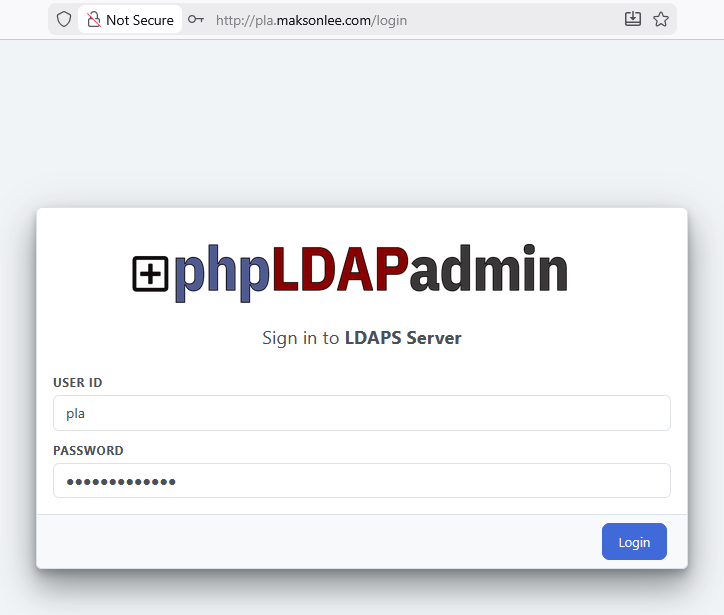
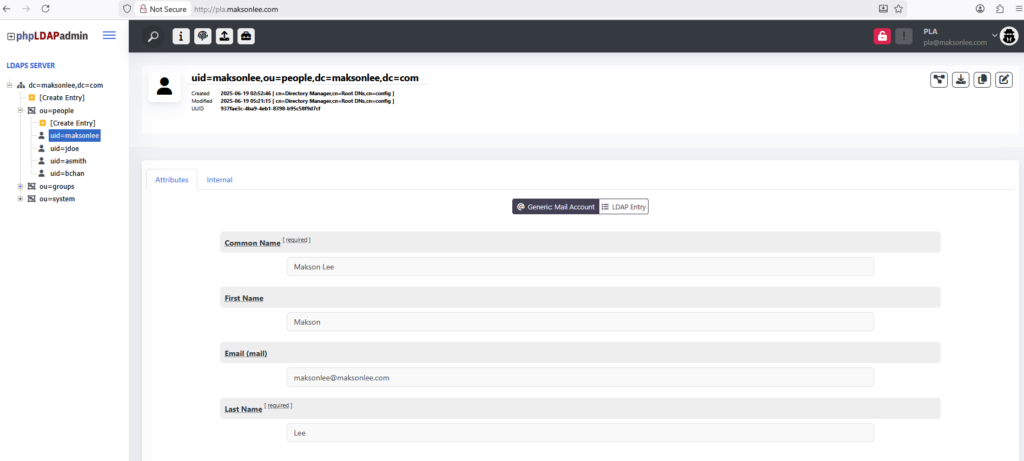
If login works and you can browse ou=people,dc=maksonlee,dc=com, your phpLDAPadmin setup is complete.
Did this guide save you time?
Support this site