
This article adds OTA updates to the ESP32 project from the previous tutorial. ThingsBoard sends firmware through LwM2M Object 5 over the existing X.509 DTLS connection. The ESP32 writes it to the inactive application slot and switches to it after validation.
The test updates v01 to v02 by adding the firmware version and active partition to the startup log.
The complete source is available on GitHub, including the v01 and v02 tags used below.
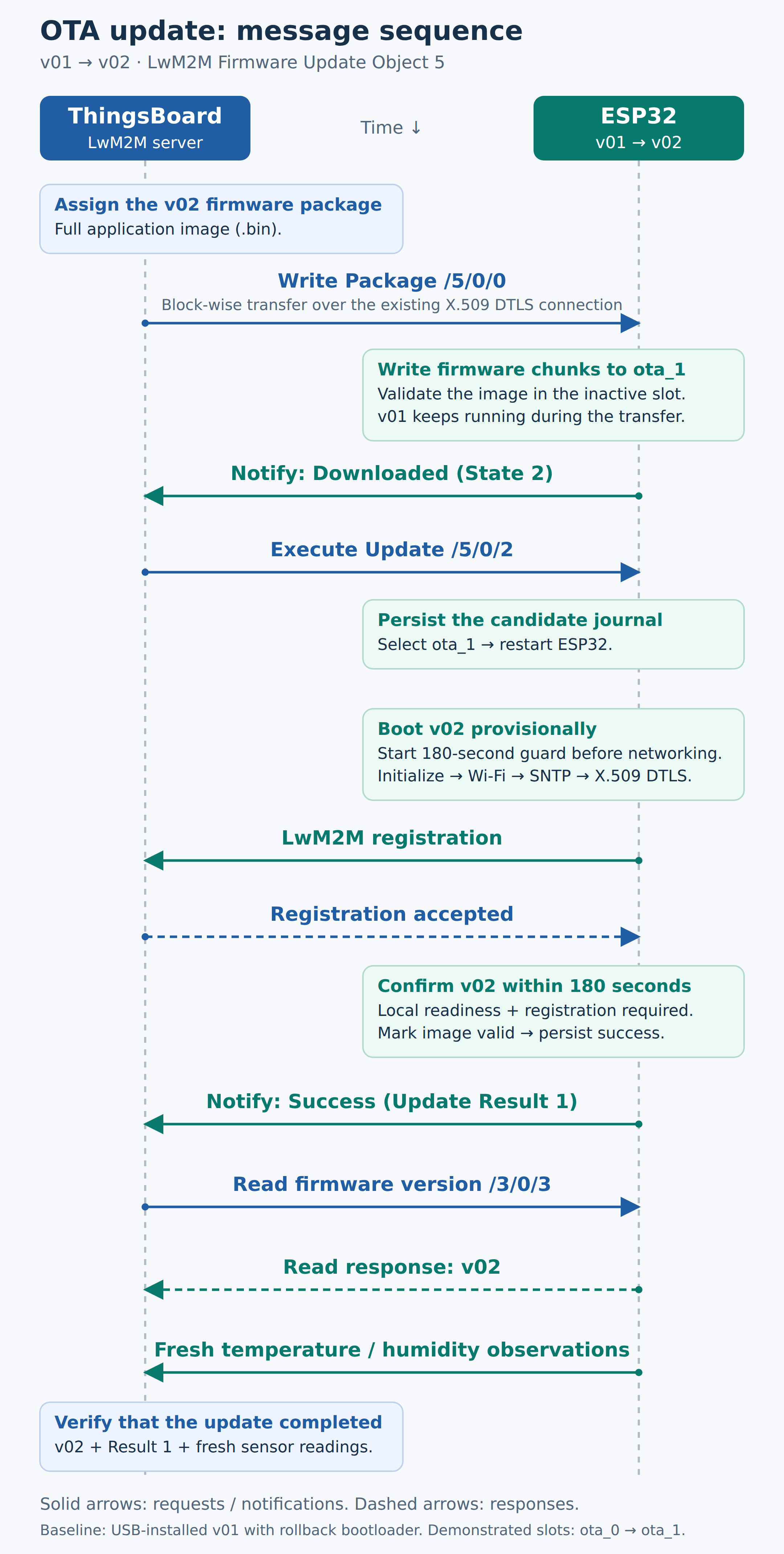
OTA Update Flow
Lab Context
- Original ESP32 with 4 MiB flash and DHT11 data on GPIO 23
- ESP-IDF 6.1 and Anjay 3.15.0
- ThingsBoard CE 4.4.0 with PR #16179 applied to the core and LwM2M transport for the preceding X.509 setup
- LwM2M 1.1 over X.509 DTLS; existing BLE Wi-Fi provisioning and device credentials
Replace example hostnames and device names with your own. Identifying details in the screenshots have been anonymized.
1. Build OTA-Capable Firmware
Anjay provides Object 5. Two project modules connect it to ESP-IDF: main/lwm2m/lwm2m_firmware.c and main/maintenance/firmware_update.c. Add both to SRCS in main/CMakeLists.txt, with app_update and bootloader_support in PRIV_REQUIRES.
These excerpts follow the four main ESP32 actions in the diagram. They show the key calls; supporting declarations and helper code are omitted.
A. Receive the Package Through Anjay
Register the callbacks in lwm2m_firmware.c, then call lwm2m_firmware_install(client) from the existing start_client(). When ThingsBoard writes to /5/0/0, Anjay calls stream_write(), which forwards the bytes to firmware_update_write().
static const anjay_fw_update_handlers_t HANDLERS = {
    .stream_open = stream_open, .stream_write = stream_write,
    .stream_finish = stream_finish, .reset = reset,
    .perform_upgrade = perform_upgrade,
    .get_name = package_name, .get_version = package_version
};

/* In lwm2m_firmware_install(): register Device Object 3 and Object 5. */
return anjay_register_object(anjay, &device)
|| anjay_fw_update_install(anjay, &HANDLERS, NULL, &initial);B. Write and Validate the Image
In firmware_update.c, select the inactive slot and write each chunk with ESP-IDF. The current firmware keeps running. After the last chunk, esp_ota_end(), esp_image_verify() and an exact-length check must all pass before Anjay reports Downloaded.
/* firmware_update_begin(): select the inactive application slot. */
target = esp_ota_get_next_update_partition(NULL);

/* validate_header(): open the writer after checking the image header. */
esp_err_t error = esp_ota_begin(target, OTA_WITH_SEQUENTIAL_WRITES, &handle);

/* firmware_update_write(): write the current chunk. */
if (length && esp_ota_write(handle, bytes, length) != ESP_OK) {
    return fail_transfer(FIRMWARE_UPDATE_FAILED);
}

/* firmware_update_finish(): close the writer, then verify the image. */
error = esp_ota_end(handle);
if (error != ESP_OK
        || esp_image_verify(ESP_IMAGE_VERIFY, &position, &metadata) != ESP_OK
        || metadata.image_len != received) {
    return fail_transfer(FIRMWARE_UPDATE_INTEGRITY);
}The header checks reject the wrong chip, project or unchanged version; the transfer checks enforce the slot size. Downloaded means the image is ready. It has not been selected for boot yet.
C. Install When ThingsBoard Sends Execute
After observing Downloaded, ThingsBoard executes /5/0/2. The callback reaches firmware_update_perform(), which records the candidate in NVS before selecting its boot partition. The reboot helper waits about one second so the Execute response can leave first.
int firmware_update_perform(void)
{
    if (!candidate_valid || status != FIRMWARE_UPDATE_DOWNLOADED) {
        return FIRMWARE_UPDATE_FAILED;
    }
    journal.address = target->address;
    if (esp_partition_get_sha256(target, journal.sha256) != ESP_OK
            || save_journal(JOURNAL_ARMED) != ESP_OK) {
        /* Anjay keeps Downloaded after an Execute failure; retain the
         * validated candidate so a later Execute can retry coherently. */
        return FIRMWARE_UPDATE_FAILED;
    }
    if (esp_ota_set_boot_partition(target) != ESP_OK) {
        save_journal(JOURNAL_FAILED);
        return FIRMWARE_UPDATE_FAILED;
    }
    status = FIRMWARE_UPDATE_UPDATING;
    firmware_update_request_reboot();
    return FIRMWARE_UPDATE_OK;
}D. Confirm the New Firmware After Registration
Start firmware_update_boot_guard_start() before networking in app_main(), then mark local startup ready with firmware_update_local_ready(). The LwM2M worker calls the confirmation hook after registration:
/* In the LwM2M worker: */
bool ready = registered();
if (ready) {
    lwm2m_firmware_registered(client);
}

/* firmware_update_confirm(): while pending_boot is true,
 * after checking local readiness and the deadline. */
if (esp_timer_stop(boot_timer) != ESP_OK
        || esp_ota_mark_app_valid_cancel_rollback() != ESP_OK) {
    firmware_update_request_reboot();
    return ESP_FAIL;
}Confirmation requires local readiness and a fresh registration within 180 seconds of startup. The firmware marks the image valid and saves success; Anjay then reports Update Result 1. Sensor readings are checked afterward. On disconnect, lwm2m_firmware_disconnect() aborts an incomplete transfer.
2. Install the Initial OTA-Capable Firmware
Run python tools/prepare_anjay.py to apply the adapter patch for Object 5 binary push. Check these values in the saved sdkconfig; sdkconfig.defaults does not override an existing configuration:
CONFIG_BOOTLOADER_APP_ROLLBACK_ENABLE=y
CONFIG_ANJAY_WITH_MODULE_FW_UPDATE=y
CONFIG_ANJAY_WITH_DOWNLOADER=nUse v01 for the initial release. Review and stage the OTA changes, then commit and tag before building in an activated ESP-IDF 6.1 environment. Create each release tag once:
git commit -m "Add ThingsBoard LwM2M OTA for v01"
git tag -a v01 -m "Firmware v01"
git status --short
git describe --exact-match --tags HEAD
idf.py -DPROJECT_VER=v01 build
python -m unittest discover -s tests -vInstall the application and rebuilt rollback-enabled bootloader over USB using the existing maintenance workflow. Keep the device’s endpoint, certificate bundle, PoP and partition layout. An application-only flash cannot enable rollback in an older bootloader.
Confirm registration and fresh sensor readings before trying OTA. Keep this USB build for recovery.
3. Commit and Tag a Test Release
For the test release, change the project-version default in CMakeLists.txt to v02 and add this startup log:
const esp_app_desc_t *app = esp_app_get_description();
const esp_partition_t *running = esp_ota_get_running_partition();
ESP_LOGI(TAG, "System init: %s %s, running partition %s",
         app->project_name, app->version,
running ? running->label : "unknown");Review and stage the release changes. Commit and tag them before producing the final OTA binary:
git commit -m "Add startup diagnostics for v02 OTA test"
git tag -a v02 -m "Firmware v02"
git status --short
git describe --exact-match --tags HEAD
idf.py -DPROJECT_VER=v02 clean build
python -m unittest discover -s tests -v
sha256sum build/wifi_prov_mgr.binBuild from the clean tagged commit and pass PROJECT_VER explicitly, since CMake can remember an earlier value. Keep the checksum with the release. Use the same target and device configuration: the endpoint is compiled into this image and must match the device certificate CN.
4. Check the LwM2M Object Models
Check the ThingsBoard model library for these exact versions. Import any missing XML from the OMA registry:
Open Resources → Files → Add resource, choose LWM2M model, upload the XML and click Add. Keep other model versions. Without the versions above, ThingsBoard may decode firmware values as opaque bytes and fail to process OTA.
5. Configure the LwM2M Profile
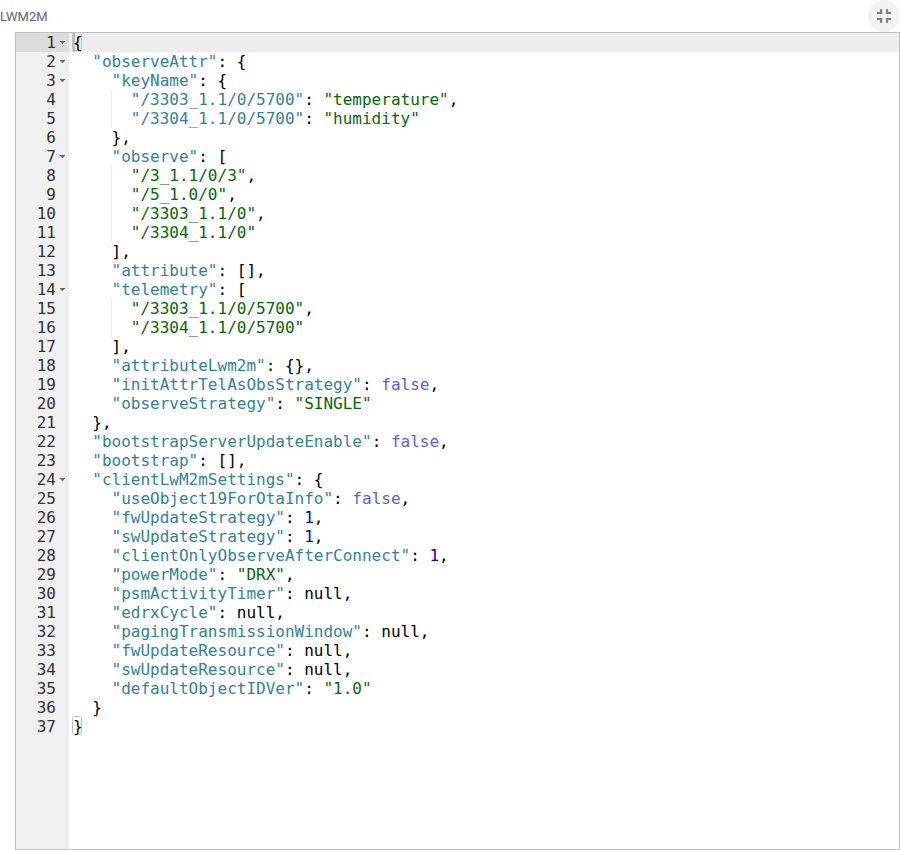
Edit the device profile’s Transport configuration → Json Config Profile Device. Update its observeAttr object to include the running version and the complete Firmware Update instance while keeping the sensor mappings:
{
  "keyName": {
    "/3303_1.1/0/5700": "temperature",
    "/3304_1.1/0/5700": "humidity"
  },
  "attribute": [],
  "telemetry": [
    "/3303_1.1/0/5700",
    "/3304_1.1/0/5700"
  ],
  "observe": [
    "/3303_1.1/0",
    "/3304_1.1/0",
    "/3_1.1/0/3",
    "/5_1.0/0"
  ],
  "attributeLwm2m": {},
  "observeStrategy": "SINGLE",
  "initAttrTelAsObsStrategy": false
}In clientLwM2mSettings, set fwUpdateStrategy to 1 and useObject19ForOtaInfo to false. Apply the changes. The JSON above is only observeAttr, not the whole transport configuration.
6. Upload and Assign the Firmware Package
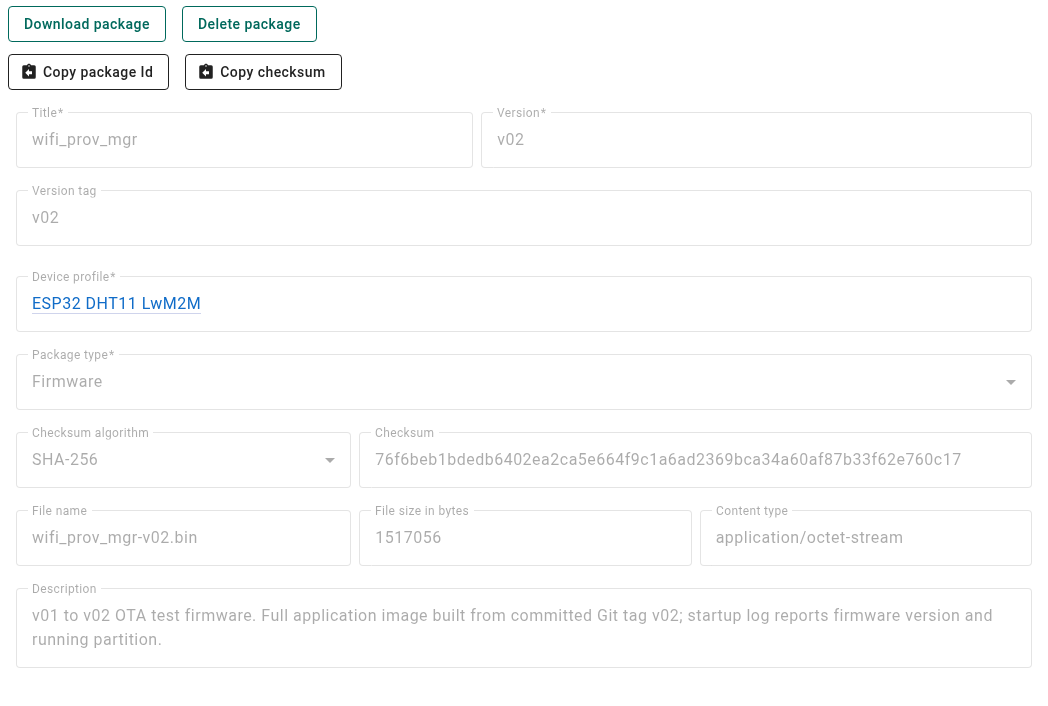
Open the OTA package manager and create a Firmware package for the device profile:
- Title:
wifi_prov_mgr - Version:
v02 - Version tag:
v02 - File: the raw
build/wifi_prov_mgr.binapplication
Match the title and version to the embedded application descriptor. Upload the raw application .bin—not a merged flash image or archive—and check its size and checksum. This is a full application image, not a delta patch; it must fit the 0x1d0000-byte application slot.
Open Entities → Devices → your ESP32 → Details. Click the pencil, set Assigned firmware to wifi_prov_mgr (v02), and apply. Assign this endpoint-specific build to the device rather than the shared profile.
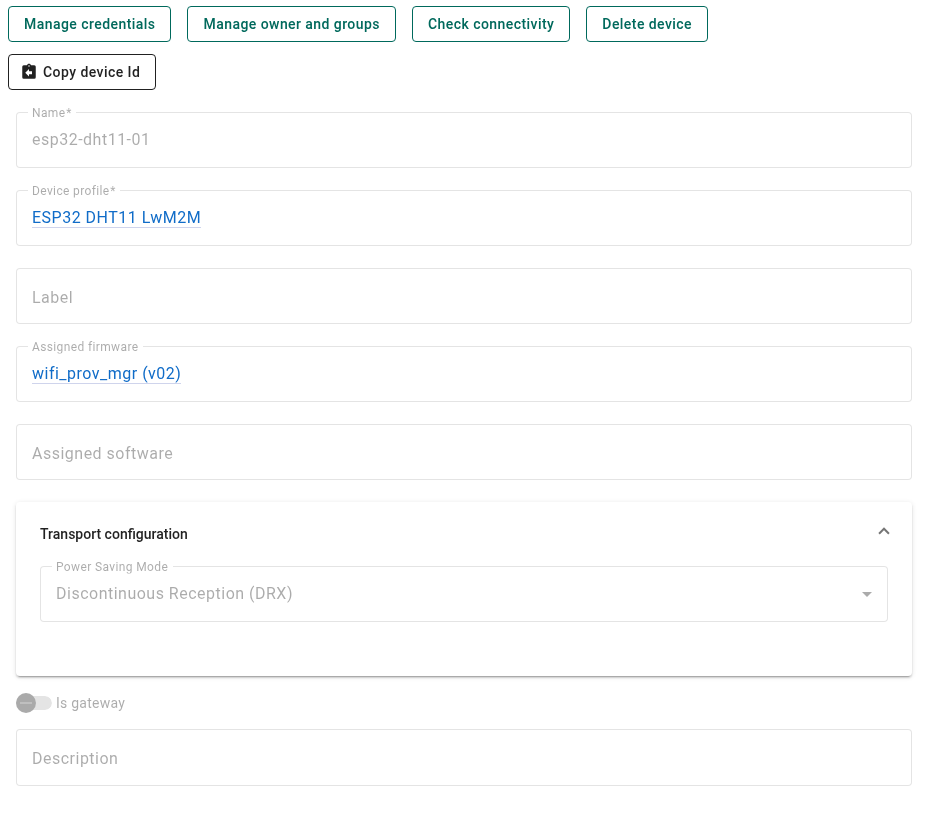
Assignment starts the update. Keep the board powered through transfer and reboot; sensor sampling may pause during the transfer.
7. Verify the Update After Reboot
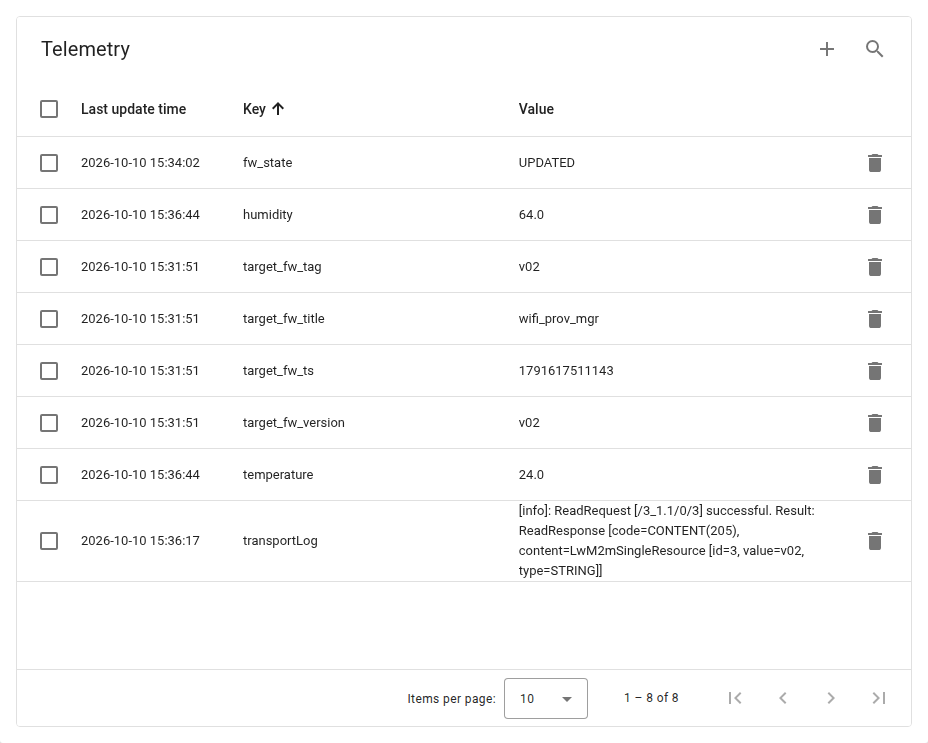
After reconnection, send each body below as a separate POST /api/rpc/twoway/{deviceId} request. Expect the running version v02 and Update Result 1 (Success), then check fresh sensor timestamps:
{"method":"Read","params":{"id":"/3_1.1/0/3"}}
{"method":"Read","params":{"id":"/5_1.0/0/5"}}The physical test on 10 October 2026 returned those values, with the device running in ota_1. The serial log also showed boot confirmation and a fresh reading:
app_main: System init: wifi_prov_mgr v02, running partition ota_1
firmware_update: New firmware confirmed after server registration
lwm2m_client: Sampled temperature=24 humidity=66ThingsBoard briefly showed UPDATED before reboot finished. Use the version, Update Result and fresh telemetry to confirm completion.
Boot Confirmation and Recovery
If the new image resets before confirmation or misses its 180-second confirmation deadline, the rollback-enabled bootloader returns to the previous valid image. An interrupted download must be sent again in full. Bootloader, partition-table and credential maintenance still use USB.
This setup uses DTLS and ESP-IDF image integrity checks; independent firmware signing and Secure Boot are not enabled. The normal OTA path passed on hardware, but power-loss and physical rollback tests remain unverified.
For protocol and bootloader details, see the ThingsBoard LwM2M OTA guide and ESP-IDF 6.1 OTA API.