
This post shows how I manage my Kubernetes Backstage deployment using Argo CD, so Backstage is continuously reconciled from Git (GitOps). I already have Backstage running in Kubernetes behind Traefik with wildcard TLS, and I already use a local env file (kubernetes/.env.k8s) to create the backstage-env Secret (covered in my previous Backstage-to-Kubernetes post).
After this guide, the workflow becomes:
- Update YAML in Git → push → Argo CD syncs
- Cluster drift is detected and reverted (self-heal)
- Removing YAML from Git removes resources in the cluster (prune)
Target URLs:
- Argo CD:
https://argocd.maksonlee.com - Backstage (K8s):
https://backstage-k8s.maksonlee.com
Repo used in this guide:
What you’ll build
- One Argo CD Application that manages everything under
kubernetes/in the Backstage repo:- PostgreSQL (Service + StatefulSet + PVC)
- Backstage (Deployment + Service + Ingress)
- A GitOps-friendly way to manage
app-config.k8s.yamlas a ConfigMap (no manualkubectl create configmap) - A simple “Backstage-only repo” layout:
kubernetes/for deployable manifestsargocd/application.yamlfor the Argo CD Application (version-controlled, no recursion)
- A clear “day-2 ops” workflow:
- bump image tag
- change Backstage config
- update the Secret (manual) + restart pods
Prerequisites
This guide assumes you already have:
- A working bare-metal Kubernetes cluster (kubeadm + containerd is fine)
- Traefik installed and HTTPS already enabled via a default wildcard certificate (TLSStore) for
*.maksonlee.com - Argo CD installed and reachable at
https://argocd.maksonlee.com - Backstage already deployable using the manifests in this folder:
~/homelab-backstage/kubernetes/
  app-config.k8s.yaml
  homelab-backstage.yaml
postgres.yaml- The namespace
backstageexists - The Secret
backstage-envexists in thebackstagenamespace (created fromkubernetes/.env.k8s)
Repo layout for GitOps
This repo is only for Backstage, so I keep the Argo CD Application manifest inside the same repo, but outside the deployed path (to avoid recursion).
Target layout:
~/homelab-backstage/
  kubernetes/
    app-config.k8s.yaml
    homelab-backstage.yaml
    postgres.yaml
    kustomization.yaml
  argocd/
application.yamlWhy we add Kustomize
In my repo, kubernetes/app-config.k8s.yaml is a Backstage config file, not a Kubernetes object. In a manual workflow, you might generate a ConfigMap with:
- kubectl create configmap … –from-file
For GitOps, Argo CD needs everything it applies to be derivable from Git. The simplest approach is:
- Add a
kustomization.yaml - Use
configMapGeneratorto turnapp-config.k8s.yamlinto a real ConfigMap - Let Argo CD render the Kustomize output automatically
- Add
kustomization.yamltokubernetes/
Create this file:
~/homelab-backstage/kubernetes/kustomization.yaml
apiVersion: kustomize.config.k8s.io/v1beta1
kind: Kustomization

namespace: backstage

resources:
  - postgres.yaml
  - homelab-backstage.yaml

generatorOptions:
  disableNameSuffixHash: false

configMapGenerator:
  - name: backstage-k8s-config
    files:
- app-config.k8s.yaml=app-config.k8s.yaml- Add
argocd/application.yaml
Create the folder:
cd ~/homelab-backstage
mkdir -p argocdCreate:
~/homelab-backstage/argocd/application.yaml
apiVersion: argoproj.io/v1alpha1
kind: Application
metadata:
  name: homelab-backstage
  namespace: argocd
spec:
  project: default

  source:
    repoURL: https://github.com/maksonlee/homelab-backstage.git
    targetRevision: main
    path: kubernetes

  destination:
    server: https://kubernetes.default.svc
    namespace: backstage

  syncPolicy:
    automated:
      prune: true
      selfHeal: true
    syncOptions:
      - CreateNamespace=true
      - PruneLast=true
- ApplyOutOfSyncOnly=true- Commit both files together
These two files belong together:
kubernetes/kustomization.yamlmakes thekubernetes/path render correctly (and generates the ConfigMap)argocd/application.yamltells Argo CD to deploy that path
Commit them in one commit:
cd ~/homelab-backstage

git add kubernetes/kustomization.yaml argocd/application.yaml
git commit -m "feat(k8s): manage backstage via gitops"
git push- Apply the Application once
Apply:
kubectl apply -f argocd/application.yamlFrom now on, Argo CD will watch kubernetes/ and continuously reconcile.
- First sync and verify
If your Backstage resources already exist (from your previous manual deployment), Argo CD will “adopt” them as long as they match what’s in Git.
argocd login argocd.maksonlee.com
# If you ever have gRPC problems through an ingress/proxy:
# argocd login argocd.maksonlee.com --grpc-web

argocd app sync homelab-backstage
argocd app wait homelab-backstage --healthOr sync from the Argo CD UI:
- Open
homelab-backstage - Click SYNC
Watch pods:
kubectl -n backstage get pods
kubectl -n backstage logs deploy/homelab-backstage -fVerify the site:
https://backstage-k8s.maksonlee.com
How to read the Argo CD tree (what “Healthy / Synced” means)
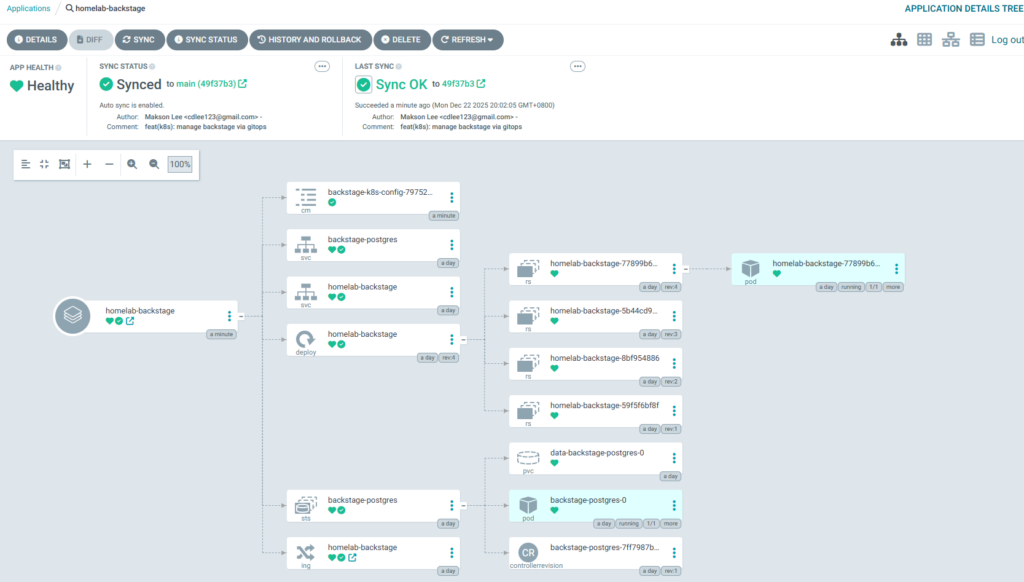
In Argo CD, a good state looks like this:
- App Health: Healthy
- Sync Status: Synced to a specific Git commit on your branch (example:
main) - Last Sync: Sync OK
- You’ll see the resource graph:
ConfigMap(generated by Kustomize)Service/Deployment/Ingressfor BackstageService/StatefulSet/PVCfor PostgreSQL
Why the ConfigMap name has a hash suffix
You’ll see something like:
- backstage-k8s-config-79752…
That’s expected. configMapGenerator adds a hash suffix so when app-config.k8s.yaml changes, Kustomize generates a new ConfigMap and the Deployment automatically references the new name (safe rollout).
Why you see multiple ReplicaSets
Under the Backstage Deployment, you’ll see multiple ReplicaSet objects like:
homelab-backstage-77899b6...homelab-backstage-5b44cd9...
That’s normal: Kubernetes keeps old ReplicaSets for rollback history.
If you want fewer old ReplicaSets, set:
spec:
revisionHistoryLimit: 2in your Backstage Deployment.
Day-2 operations
Once Argo CD owns the app, most changes are “edit Git → push”.
Update the Backstage image
Edit kubernetes/homelab-backstage.yaml and change:
image: harbor.maksonlee.com/backstage/homelab-backstage:NEW_TAGCommit and push:
cd ~/homelab-backstage
git add kubernetes/homelab-backstage.yaml
git commit -m "chore(k8s): bump backstage image to NEW_TAG"
git pushArgo CD will detect the change and sync it.
Update Backstage config (app-config.k8s.yaml)
Edit:
kubernetes/app-config.k8s.yaml
Commit and push:
cd ~/homelab-backstage
git add kubernetes/app-config.k8s.yaml
git commit -m "chore(k8s): update backstage k8s config"
git pushBecause the ConfigMap is generated via Kustomize, the ConfigMap name changes (hash), and the Deployment reference is updated safely.
Did this guide save you time?
Support this site