
This post shows how to trigger a Jenkins Pipeline build on every GitHub push when your Jenkinsfile is stored in a different repository.
My setup:
- Pipeline repo (Jenkinsfile / pipeline code):
https://github.com/maksonlee/jenkins-pipelines - Source repo to build:
https://github.com/maksonlee/beepbeep - Jenkins job type: Pipeline → Pipeline script from SCM
- Trigger:
githubPush()in the Jenkinsfile - Webhook: manual webhook on the source repo only
- Builds may run on different agents/containers, so host key verification must be centralized
Understand the split-repo model
In this design, there are two GitHub repositories:
- Pipeline repo (
jenkins-pipelines)
Stores Jenkinsfiles, shared pipeline logic, and reusable CI code. - Source repo (
beepbeep)
Stores the application source code only.
The Jenkins job loads its Jenkinsfile from jenkins-pipelines, then checks out and builds beepbeep during the pipeline run.
This keeps application repositories clean and makes pipeline logic reusable across multiple projects.
Decide why you should not use auto-managed GitHub webhooks
Jenkins can auto-manage GitHub webhooks if you configure a GitHub “server” (OAuth/PAT) and enable automatic hook management.
That can be convenient when Jenkinsfile and source code are in the same repo.
But in the split-repo design:
- Your Jenkins job SCM points to
jenkins-pipelines - Your pipeline checks out
beepbeep
If Jenkins is allowed to manage webhooks automatically, it may create webhooks for both repositories:
- webhook on
jenkins-pipelines→ pipeline repo changes can trigger builds (noise) - webhook on
beepbeep→ source changes trigger builds (desired)
I want one clean signal:
Only pushes to the source repo (beepbeep) should trigger builds.
So I intentionally do manual webhook creation on beepbeep only, and I avoid Jenkins auto-webhook management.
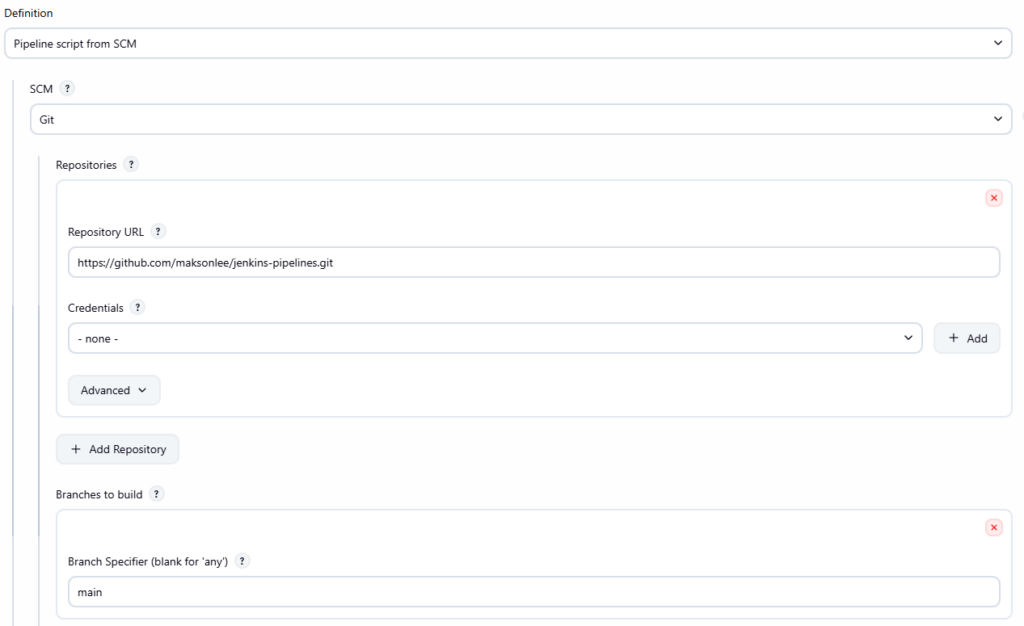
- Create the Jenkins Pipeline job
Create a Jenkins Pipeline job:
- Definition: Pipeline script from SCM
- SCM: Git
- Repository URL:
https://github.com/maksonlee/jenkins-pipelines.git - Branch:
main - Script Path: your Jenkinsfile path inside that repo (example:
Jenkinsfile)
This job loads its pipeline definition from the pipeline repo.
- Enable GitHub push triggering in the Jenkinsfile
In your Jenkinsfile, enable the trigger:
triggers {
  githubPush()
}That’s all you need on the Pipeline side.
Important: run the job once after adding githubPush()
In this split-repo design, Jenkins may need one successful run to “learn” the SCM state and make webhook-triggered polling behave consistently.
So after you add the trigger (or after creating the job), run the job once manually before you rely on the webhook.
- Ensure the Jenkinsfile checks out the source repo
Your Jenkinsfile is stored in jenkins-pipelines, but it checks out beepbeep during the build.
Here is your example Jenkinsfile:
@Library('jenkins-shared-lib') _
pipeline {
agent { label 'ssh-agent-with-docker' }
triggers {
  githubPush()
}
stages {
stage('Fetch code') {
steps {
deleteDir()
git credentialsId: 'vault-github-ssh', url: 'git@github.com:maksonlee/beepbeep.git'
}
}
stage('Build & Sign (AAB)') {
steps {
script {
gradleRelease(':app:bundleRelease', [
image : 'cdlee/android-build-env:latest',
keystoreVaultPath: 'secret/jenkins/mobile/app/com.maksonlee.beepbeep',
jksPath : '/tmp/beepbeep-upload.jks'
])
stash name: 'aab',
includes: 'app/build/outputs/bundle/release/*.aab, app/build/outputs/mapping/release/**'
}
}
}
}
post {
always {
cleanWs(deleteDirs: true, notFailBuild: true)
}
}
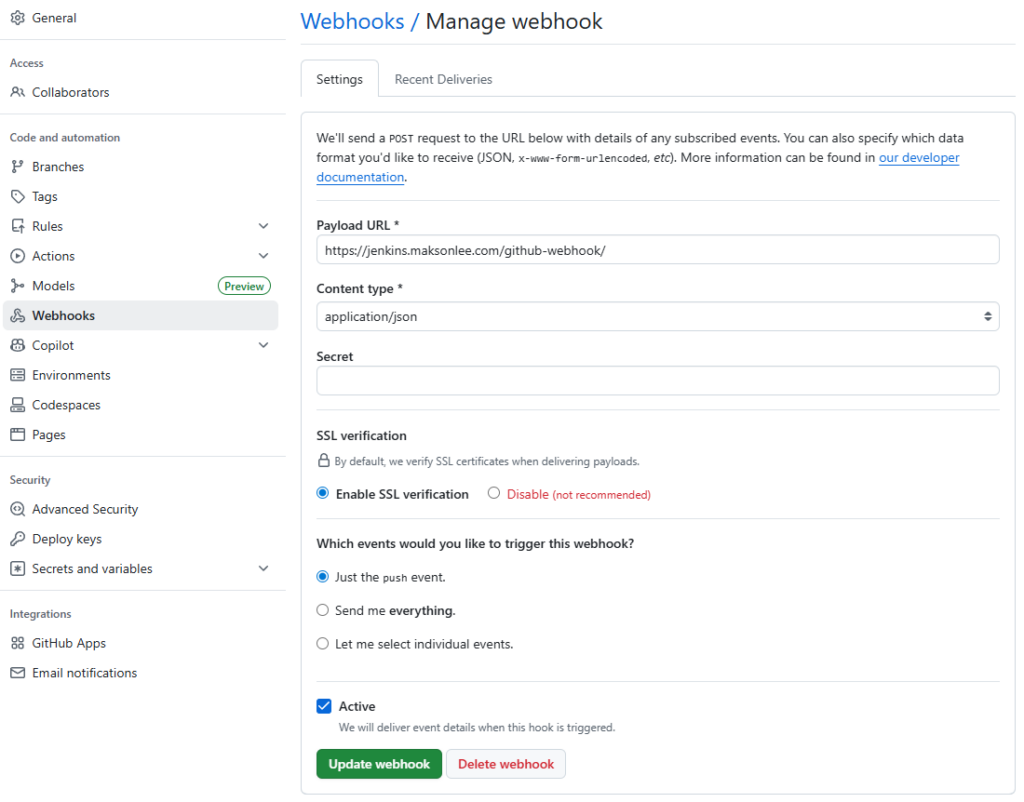
}- Create the GitHub webhook on the source repo only
On GitHub:
maksonlee/beepbeep → Settings → Webhooks → Add webhook
- Payload URL:
https://jenkins.maksonlee.com/github-webhook/ - Content type:
application/json - Which events: Just the push event
Do not create a webhook on maksonlee/jenkins-pipelines.
- Fix SSH host key verification centrally
If you use SSH (git@github.com:...), polling can fail with:
No ED25519 host key is known for github.comHost key verification failed
In production, builds may run on different agents/containers, so you should not rely on per-node ~/.ssh/known_hosts.
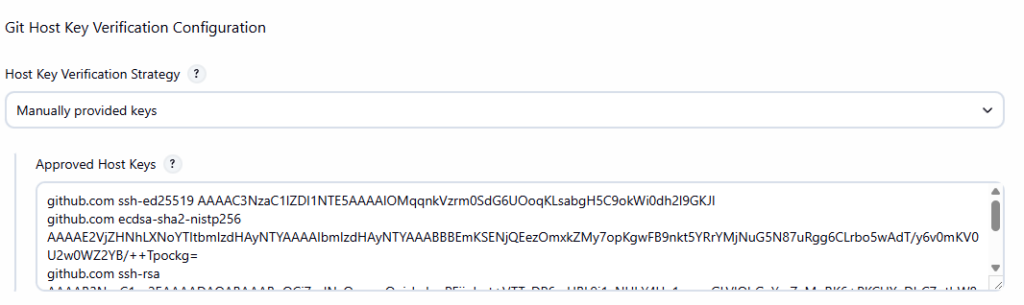
Instead, configure host key verification centrally in Jenkins:
- Go to Manage Jenkins → Security → Git Host Key Verification Configuration
- Set Host Key Verification Strategy to Manually provided keys
- Paste GitHub host keys into Approved Host Keys (known_hosts format)
Generate keys on a trusted machine:
ssh-keyscan -t ed25519 github.com
ssh-keyscan -t ecdsa github.com
ssh-keyscan -t rsa github.comPaste the output into Approved Host Keys, then Save.
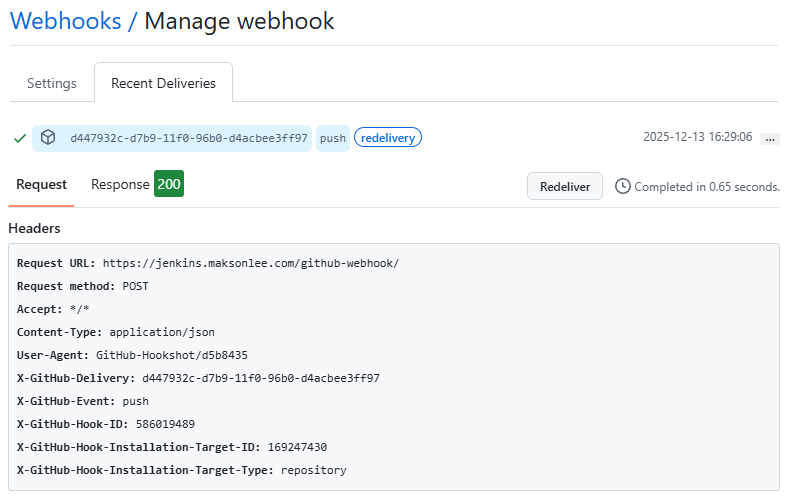
- Verify the end-to-end flow
- Run the job once manually (bootstrap)
- Push a commit to
maksonlee/beepbeep - GitHub webhook “Recent deliveries” shows HTTP 2xx
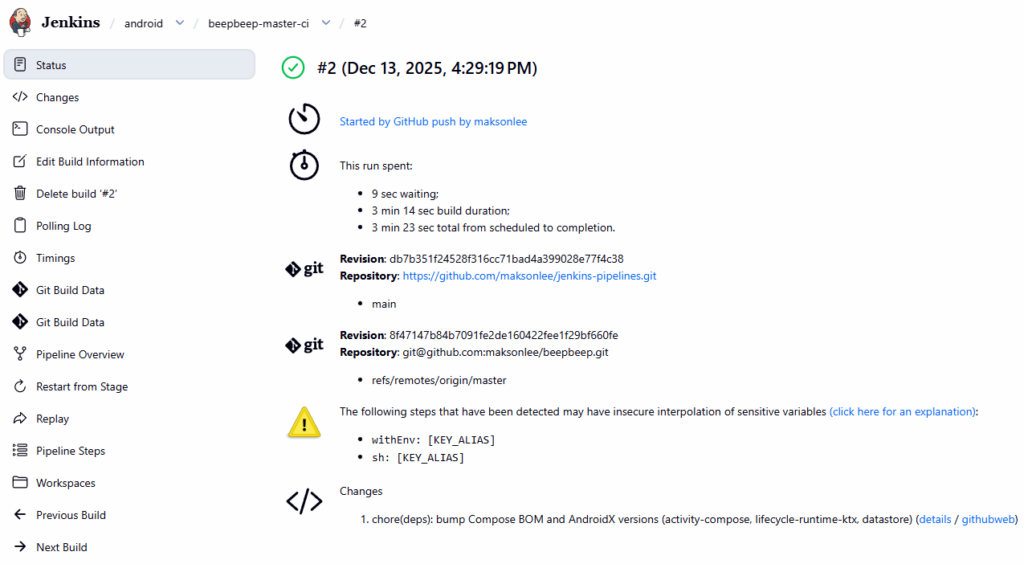
- Jenkins schedules a build shortly after
If Jenkins shows “Started by event …” but ends with “No changes”, check the polling log for errors (host key verification is the most common one).
- Summary
To trigger Jenkins builds on GitHub push when your Jenkinsfile is stored in a different repository:
- Keep Jenkinsfile/pipelines in
maksonlee/jenkins-pipelines - Create a Pipeline job that loads Jenkinsfile from that repo
- Use
githubPush()in the Jenkinsfile - Checkout/build
maksonlee/beepbeepinside the pipeline - Create a manual webhook on
beepbeeponly - Centralize GitHub SSH host keys in Jenkins (no per-agent setup)
- Run the job once manually to bootstrap the configuration
Did this guide save you time?
Support this site