
In a previous post,
I installed Backstage on Ubuntu 24.04, wired it to Keycloak for OIDC login, and ran it directly from source (no Docker, minimal code changes):
- Backstage UI:
https://backstage.maksonlee.com - Keycloak:
https://keycloak.maksonlee.com(realmmaksonlee.com)
In this follow-up, I:
- Keep Keycloak for SSO (OIDC login).
- Make Backstage users and groups come from LDAP (OpenDJ) via the official
ldapOrgprovider. - Run the Backstage backend using production configuration (public URLs + OIDC + LDAP) while still using
packages/backend start(the standard dev runner).
Architecture
Components:
- LDAP (OpenDJ)
- Base DN:
dc=maksonlee,dc=com - Users:
ou=people,dc=maksonlee,dc=com - Service accounts:
ou=system,dc=maksonlee,dc=com - Groups:
ou=organization,ou=groups,dc=maksonlee,dc=com
- Base DN:
- Keycloak
- Realm:
maksonlee.com - Backstage client:
backstage(confidential) - Uses LDAP as user federation provider (user data ultimately lives in LDAP).
- Realm:
- Backstage
- URL:
https://backstage.maksonlee.com - Backend DB: SQLite (better-sqlite3) in
/var/lib/backstage/db - Authentication: OIDC via Keycloak
- Organization:
UserandGroupentities imported from LDAP withldapOrg.
- URL:
Flow:
- User logs in to Backstage using Keycloak.
- Keycloak authenticates against LDAP and returns an OIDC token with
email. - Backstage uses
emailMatchingUserEntityProfileEmailto map that email to aUserentity in the catalog. - That
Userentity (and itsGroupmemberships) are synced from LDAP.
Why sync from LDAP instead of Keycloak?
In my setup:
- LDAP (OpenDJ) is the real source of truth for users and groups.
- Keycloak is configured to use LDAP as its user provider (user federation).
That means the chain is already:
LDAP → Keycloak (for login)
If I also synced org data from Keycloak, I’d effectively have:
LDAP → Keycloak → Backstage
Backstage ships with a first-party LDAP org provider, so it’s simpler and more direct to:
- Sync
UserandGroupentities straight from LDAP, and - Use Keycloak only for OIDC (authentication + tokens).
In other words:
LDAP owns directory data,
Keycloak owns authentication,
Backstage ties them together.
LDAP layout details
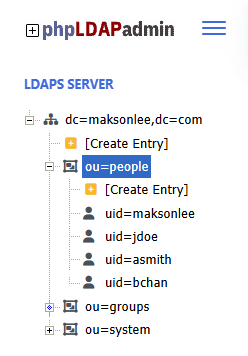
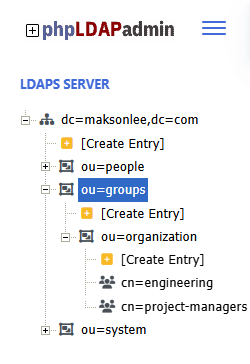
My directory tree looks like this:
- Base DN
dc=maksonlee,dc=com - Users
ou=people,dc=maksonlee,dc=com- Object class:
inetOrgPerson - Example users:
uid=maksonleeuid=jdoeuid=asmithuid=bchan
- Key attributes:
uidcnmailisMemberOf(contains group DNs)
- Object class:
- Service accounts
ou=system,dc=maksonlee,dc=com- Example:
uid=backstage,uid=jenkins, …
- Example:
- Groups
ou=organization,ou=groups,dc=maksonlee,dc=com- Object class:
groupOfNames - Example:
cn=engineering,cn=project-managers - Membership attribute:
member(DNs of users)
- Object class:
We’ll map:
- Users:
uid→metadata.name,cn→ display name,mail→ email. - Groups: cn → metadata.name, member → spec.children.
Backstage & Keycloak recap
In app-config.production.yaml I already had:
app:
  baseUrl: https://backstage.maksonlee.com

backend:
  baseUrl: https://backstage.maksonlee.com
  listen: '127.0.0.1:7007'
  database:
    client: better-sqlite3
    connection:
      directory: /var/lib/backstage/db

auth:
  environment: production
  session:
    secret: ${AUTH_SESSION_SECRET}
  providers:
    oidc:
      production:
        metadataUrl: https://keycloak.maksonlee.com/realms/maksonlee.com/.well-known/openid-configuration
        clientId: ${AUTH_OIDC_CLIENT_ID}
        clientSecret: ${AUTH_OIDC_CLIENT_SECRET}
        additionalScopes:
          - profile
          - email
        prompt: auto
        signIn:
          resolvers:
- resolver: emailMatchingUserEntityProfileEmailI reuse this exactly as-is; I only add LDAP as a catalog provider.
- Install the LDAP catalog backend module
From the Backstage repo:
cd ~/homelab-backstage
yarn --cwd packages/backend add @backstage/plugin-catalog-backend-module-ldapThis installs the official ldapOrg provider for the catalog backend.
- Enable the LDAP module in
packages/backend/src/index.ts
My backend uses the new backend system:
import { createBackend } from '@backstage/backend-defaults';

const backend = createBackend();

// app & proxy
backend.add(import('@backstage/plugin-app-backend'));
backend.add(import('@backstage/plugin-proxy-backend'));

// scaffolder
backend.add(import('@backstage/plugin-scaffolder-backend'));
backend.add(import('@backstage/plugin-scaffolder-backend-module-github'));
backend.add(
  import('@backstage/plugin-scaffolder-backend-module-notifications'),
);

// techdocs
backend.add(import('@backstage/plugin-techdocs-backend'));

// auth
backend.add(import('@backstage/plugin-auth-backend'));
backend.add(import('@backstage/plugin-auth-backend-module-guest-provider'));
backend.add(import('@backstage/plugin-auth-backend-module-oidc-provider'));

// catalog
backend.add(import('@backstage/plugin-catalog-backend'));
backend.add(
  import('@backstage/plugin-catalog-backend-module-scaffolder-entity-model'),
);

// catalog logs
backend.add(import('@backstage/plugin-catalog-backend-module-logs'));

// permission
backend.add(import('@backstage/plugin-permission-backend'));
backend.add(
  import('@backstage/plugin-permission-backend-module-allow-all-policy'),
);

// For simplicity this example uses the allow-all permission policy,
// which is not suitable for production. In a real deployment you
// should replace it with a custom policy that checks group membership.

// search
backend.add(import('@backstage/plugin-search-backend'));
backend.add(import('@backstage/plugin-search-backend-module-catalog'));
backend.add(import('@backstage/plugin-search-backend-module-techdocs'));

// kubernetes, notifications, signals
backend.add(import('@backstage/plugin-kubernetes-backend'));
backend.add(import('@backstage/plugin-notifications-backend'));
backend.add(import('@backstage/plugin-signals-backend'));

backend.start();I added the LDAP module in the catalog section:
// catalog
backend.add(import('@backstage/plugin-catalog-backend'));
backend.add(
  import('@backstage/plugin-catalog-backend-module-scaffolder-entity-model'),
);

// NEW: LDAP org provider
backend.add(import('@backstage/plugin-catalog-backend-module-ldap'));

// catalog logs
backend.add(import('@backstage/plugin-catalog-backend-module-logs'));No other TypeScript changes required.
- Create a read-only bind user in LDAP
Under ou=system,dc=maksonlee,dc=com I created a dedicated service account:
- DN:
uid=backstage,ou=system,dc=maksonlee,dc=com - Object classes: e.g.
inetOrgPerson - Attributes:
uid,cn,sn,userPassword, etc. - ACLs: read access to:
ou=people,dc=maksonlee,dc=comou=organization,ou=groups,dc=maksonlee,dc=com
This account is only for Backstage to read users and groups.
- Configure catalog to use LDAP
Remove demo org data from catalog locations
In app-config.production.yaml, the original catalog section had:
catalog:
  locations:
    - type: file
      target: ./examples/entities.yaml

    - type: file
      target: ./examples/template/template.yaml
      rules:
        - allow: [Template]

    # Local example organizational data
    - type: file
      target: ./examples/org.yaml
      rules:
- allow: [User, Group]I commented out org.yaml so org data comes only from LDAP:
catalog:
  locations:
    - type: file
      target: ./examples/entities.yaml

    - type: file
      target: ./examples/template/template.yaml
      rules:
        - allow: [Template]

    # Org data now comes from LDAP, not from this example file.
    # - type: file
    #   target: ./examples/org.yaml
    #   rules:
# - allow: [User, Group](If examples/entities.yaml / template.yaml don’t exist in your repo, you can also comment those out to avoid warnings.)
Add ldapOrg provider
Still under catalog:
catalog:
  locations:
    - type: file
      target: ./examples/entities.yaml

    - type: file
      target: ./examples/template/template.yaml
      rules:
        - allow: [Template]

  providers:
    ldapOrg:
      default:
        target: ldaps://ldap.maksonlee.com

        bind:
          dn: "uid=backstage,ou=system,dc=maksonlee,dc=com"
          secret: ${LDAP_BIND_PASSWORD}

        schedule:
          frequency: PT1H
          timeout: PT15M
          initialDelay: PT3M

        users:
          - dn: "ou=people,dc=maksonlee,dc=com"
            options:
              scope: sub
              filter: "(&(objectClass=inetOrgPerson)(uid=*))"
            map:
              rdn: uid
              name: uid                # Backstage user:default/<uid>
              displayName: cn
              email: mail              # used by emailMatchingUserEntityProfileEmail
              memberOf: isMemberOf
            set:
              metadata.namespace: default

        groups:
          - dn: "ou=organization,ou=groups,dc=maksonlee,dc=com"
            options:
              scope: sub
              filter: "(objectClass=groupOfNames)"
            map:
              rdn: cn
              name: cn                 # Backstage group:default/<cn>
              displayName: cn
              description: description
              members: member          # DNs of users
            set:
              metadata.namespace: default
              # Optional: gives nicer UI headers instead of "UNKNOWN"
# spec.type: teamThis tells Backstage to:
- Connect to LDAP over LDAPS.
- Bind with
uid=backstage,ou=system,…. - Periodically read users and groups from LDAP and convert them into catalog entities.
- (Optional) reset the SQLite DB
If you previously loaded demo entities or want a clean slate:
sudo rm -rf /var/lib/backstage/db
sudo mkdir -p /var/lib/backstage/db
sudo chown "$USER":"$USER" /var/lib/backstage/dbBackstage will re-create the DB and run migrations at next startup.
- Start Backstage using production configuration (OIDC + LDAP)
I run the backend like this:
cd ~/homelab-backstage

AUTH_SESSION_SECRET='your-32-byte-random-hex' \
AUTH_OIDC_CLIENT_ID='backstage' \
AUTH_OIDC_CLIENT_SECRET='your-real-keycloak-client-secret' \
LDAP_BIND_PASSWORD='your-ldap-bind-password' \
yarn --cwd packages/backend start \
  --config ../../app-config.yaml \
--config ../../app-config.production.yamlNotes:
AUTH_SESSION_SECRETcan be any 32-byte random hex.AUTH_OIDC_CLIENT_IDmust match the Keycloak client ID (herebackstage).AUTH_OIDC_CLIENT_SECRETmust be exactly the Keycloak client secret.LDAP_BIND_PASSWORDis the password foruid=backstage,ou=system,….
- Verify LDAP sync from logs
When the backend starts, I see:
Registered scheduled task: LdapOrgEntityProvider:default:refresh, {"cadence":"PT1H","initialDelayDuration":"PT3M","timeoutAfterDuration":"PT15M"}After the initial delay, the LDAP provider runs:
{"class":"LdapOrgEntityProvider","level":"info","message":"Reading LDAP users and groups", ...}
{"class":"LdapOrgEntityProvider","level":"info","message":"Read 4 LDAP users and 2 LDAP groups in 1.0 seconds. Committing...", ...}
{"class":"LdapOrgEntityProvider","level":"info","message":"Committed 4 LDAP users and 2 LDAP groups in 0.0 seconds.", ...}That means:
- Backstage successfully connected to LDAP.
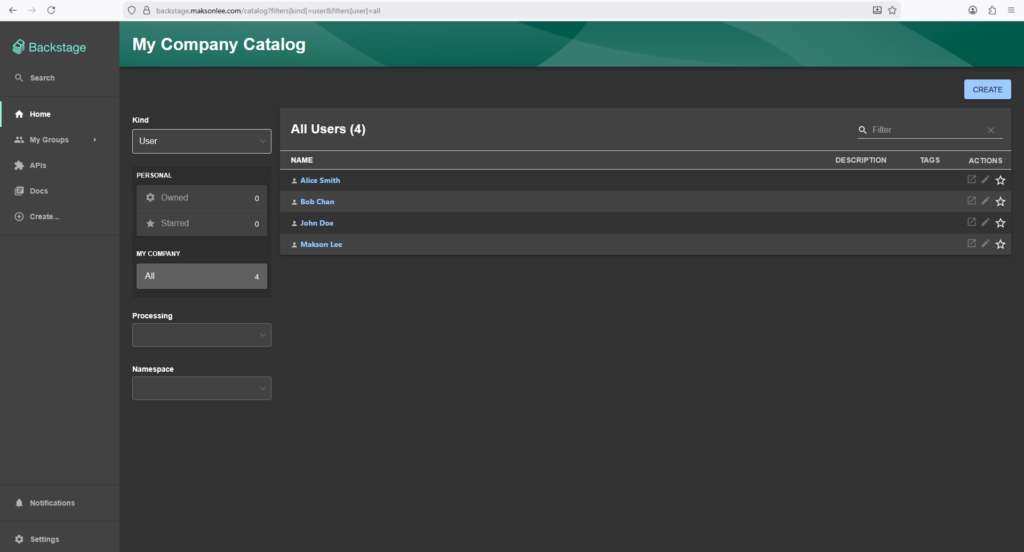
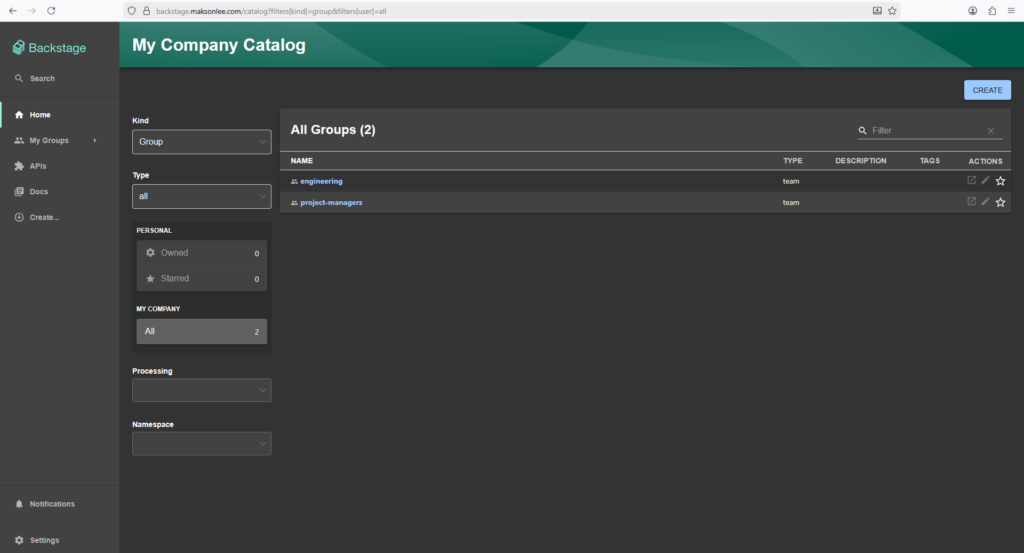
- It found 4 users and 2 groups.
- They were written into the catalog DB.
If you want to force a refresh manually later, you can do it with the catalog refresh API plus authentication, but with the schedule in place it’s not necessary for this post.
- See users and groups in the Backstage UI
List all users
- Go to My Company Catalog.
- In the Kind dropdown (top-left), choose User.
You should see something like:
List all groups
- Go to My Company Catalog.
- In the Kind dropdown (top-left), choose Group.
You should see:
Did this guide save you time?
Support this site