
In a previous post,
We have a Kubernetes cluster that exposes HTTP for
app1.maksonlee.comapp2.maksonlee.com
through Traefik and MetalLB.
In this follow-up, we’ll enable HTTPS using a single wildcard certificate:
*.maksonlee.com(subdomains only; the nakedmaksonlee.comis out of scope for this lab)
Goals
- Use cert-manager + Let’s Encrypt DNS-01 via Cloudflare.
- Keep Traefik stateless (no
acme.json). - Configure the wildcard certificate once for Traefik as a default TLS certificate.
- Any future app that uses
ingressClassName: traefikautomatically gets HTTPS with*.maksonlee.com, no per-app TLS config.
Flow:
- Prerequisites: existing bare-metal HA cluster with Traefik + MetalLB.
- Install cert-manager with Helm.
- Store an existing Cloudflare API token as a Kubernetes Secret.
- Create a staging ClusterIssuer.
- Request a staging wildcard cert for
*.maksonlee.com(smoke test). - Create a production ClusterIssuer.
- Request a production wildcard cert in the
traefiknamespace. - Configure Traefik’s default TLSStore to use the wildcard cert and redirect HTTP→HTTPS.
- Verify existing apps over HTTPS and summary.
Prerequisites: Existing HA Cluster with Traefik + MetalLB
This post assumes you already have:
- Kubernetes:
- 3-node kubeadm cluster, all nodes are control-plane + worker.
- CNI: Calico (
10.244.0.0/16Pod CIDR).
- Nodes:
k8s-1.maksonlee.com–192.168.0.99k8s-2.maksonlee.com–192.168.0.100k8s-3.maksonlee.com–192.168.0.101
- Control-plane VIP (kube-vip):
k8s.maksonlee.com→192.168.0.97:6443
- MetalLB:
- L2 mode, pool:
192.168.0.98-192.168.0.98
- L2 mode, pool:
- Traefik:
- Installed via Helm in namespace
traefik LoadBalancerService withEXTERNAL-IP: 192.168.0.98- 3 replicas, one pod per node (podAntiAffinity).
- Installed via Helm in namespace
- Example apps:
app1.maksonlee.com→192.168.0.98app2.maksonlee.com→192.168.0.98- Ingress uses
ingressClassName: traefik, HTTP only.
- Install cert-manager with Helm
Install cert-manager from the official Helm chart (example: v1.19.1):
helm install \
  cert-manager oci://quay.io/jetstack/charts/cert-manager \
  --version v1.19.1 \
  --namespace cert-manager \
  --create-namespace \
  --set crds.enabled=true \
--set 'extraArgs={--dns01-recursive-nameservers-only,--dns01-recursive-nameservers=8.8.8.8:53\,1.1.1.1:53}'Notes:
--create-namespacecreates thecert-managernamespace automatically.crds.enabled=trueinstalls cert-manager CRDs.extraArgsforces DNS-01 checks to use public resolvers (8.8.8.8 and 1.1.1.1), which helps with split-horizon / internal DNS setups.
Verify:
kubectl get pods -n cert-managerYou should see:
cert-manager-xxxxxcert-manager-cainjector-xxxxxcert-manager-webhook-xxxxx
all Running and READY=1/1.
- Store the Cloudflare API Token in Kubernetes
Assume you already created a Cloudflare API token for maksonlee.com that:
- Has permission to edit DNS records in that zone.
Store this token as a Secret in the cert-manager namespace:
kubectl create secret generic cloudflare-api-token-secret \
  --namespace cert-manager \
--from-literal=api-token='<YOUR_CLOUDFLARE_API_TOKEN>'Replace <YOUR_CLOUDFLARE_API_TOKEN> with your actual token string.
Verify:
kubectl get secret cloudflare-api-token-secret -n cert-managerNow cert-manager’s ACME solver can access Cloudflare to create _acme-challenge.* TXT records.
- Create the Staging ClusterIssuer
clusterissuer-staging.yaml:
apiVersion: cert-manager.io/v1
kind: ClusterIssuer
metadata:
  name: letsencrypt-staging
spec:
  acme:
    email: admin@maksonlee.com
    server: https://acme-staging-v02.api.letsencrypt.org/directory
    privateKeySecretRef:
      name: letsencrypt-staging-account-key
    solvers:
      - dns01:
          cloudflare:
            apiTokenSecretRef:
              name: cloudflare-api-token-secret
key: api-tokenApply:
kubectl apply -f clusterissuer-staging.yamlCheck it:
kubectl describe clusterissuer letsencrypt-stagingOnce cert-manager finishes registering the ACME account, you should see:
Status:
  Acme:
    Last Registered Email:  admin@maksonlee.com
  Conditions:
    Type:    Ready
    Status:  True
    Reason:  ACMEAccountRegistered
Message: The ACME account was registered with the ACME serverTemporary rate-limit warnings from the staging endpoint are normal; cert-manager retries and eventually marks the issuer Ready=True.
- Staging Wildcard Certificate Smoke Test (
*.maksonlee.com)
Request a staging wildcard certificate in the traefik namespace as an immediate smoke test.
wildcard-staging-cert.yaml:
apiVersion: cert-manager.io/v1
kind: Certificate
metadata:
  name: wildcard-maksonlee-com-staging
  namespace: traefik
spec:
  secretName: wildcard-maksonlee-com-staging-tls
  dnsNames:
    - "*.maksonlee.com"
  issuerRef:
    name: letsencrypt-staging
kind: ClusterIssuerApply:
kubectl apply -f wildcard-staging-cert.yamlYou may see:
Warning: spec.privateKey.rotationPolicy: In cert-manager >= v1.18.0, the default value changed from `Never` to `Always`.This is informational; default Always is fine.
Verify:
kubectl get certificate -n traefik
kubectl describe certificate wildcard-maksonlee-com-staging -n traefikYou want:
Type: ReadyStatus: TrueMessage: Certificate is up to date and has not expired
and the Secret:
kubectl get secret wildcard-maksonlee-com-staging-tls -n traefikChecking challenges:
kubectl get challenges.acme.cert-manager.io -AIt’s normal to see No resources found once issuance has completed; cert-manager cleans them up.
This confirms your DNS-01 solver, Cloudflare token, and wildcard name are all working in staging before moving to production.
- Production ClusterIssuer
clusterissuer-prod.yaml:
apiVersion: cert-manager.io/v1
kind: ClusterIssuer
metadata:
  name: letsencrypt-prod
spec:
  acme:
    email: admin@maksonlee.com
    server: https://acme-v02.api.letsencrypt.org/directory
    privateKeySecretRef:
      name: letsencrypt-prod-account-key
    solvers:
      - dns01:
          cloudflare:
            apiTokenSecretRef:
              name: cloudflare-api-token-secret
key: api-tokenApply:
kubectl apply -f clusterissuer-prod.yaml- Production Wildcard Certificate (in
traefik)
wildcard-prod-cert.yaml:
apiVersion: cert-manager.io/v1
kind: Certificate
metadata:
  name: wildcard-maksonlee-com
  namespace: traefik
spec:
  secretName: wildcard-maksonlee-com-tls
  dnsNames:
    - "*.maksonlee.com"
  issuerRef:
    name: letsencrypt-prod
kind: ClusterIssuerApply:
kubectl apply -f wildcard-prod-cert.yaml

kubectl get certificate -n traefik
kubectl describe certificate wildcard-maksonlee-com -n traefikWait until:
Type: ReadyStatus: TrueMessage: Certificate is up to date and has not expired
Then confirm the Secret:
kubectl get secret wildcard-maksonlee-com-tls -n traefikNow you have a real Let’s Encrypt wildcard cert stored in:
traefiknamespace- Secret
wildcard-maksonlee-com-tls
Next step: teach Traefik to use this as the default TLS certificate.
- Configure Traefik: HTTP→HTTPS and Default Wildcard Cert
We want:
- Traefik Service to stay as
LoadBalancerwithEXTERNAL-IP: 192.168.0.98. - HTTP on
webredirected to HTTPS onwebsecure. - Any HTTPS route without an explicit Secret to use the wildcard certificate from
wildcard-maksonlee-com-tls.
Update traefik-values.yaml:
service:
  enabled: true
  type: LoadBalancer
  spec:
    loadBalancerIP: 192.168.0.98

providers:
  kubernetesIngress:
    enabled: true
    ingressClass: traefik

ingressClass:
  enabled: true
  isDefaultClass: true

# HTTP → HTTPS redirect only (keep default 8000/8443 inside the pod)
additionalArguments:
  - "--entrypoints.web.http.redirections.entrypoint.to=websecure"
  - "--entrypoints.web.http.redirections.entrypoint.scheme=https"

deployment:
  replicas: 3

affinity:
  podAntiAffinity:
    preferredDuringSchedulingIgnoredDuringExecution:
      - weight: 100
        podAffinityTerm:
          labelSelector:
            matchLabels:
              app.kubernetes.io/name: traefik
          topologyKey: kubernetes.io/hostname

# Default TLS store using the wildcard Secret in the traefik namespace
tlsStore:
  default:
    defaultCertificate:
secretName: wildcard-maksonlee-com-tlsKey points:
- We don’t override the internal ports; the chart continues to expose:
webon 8000/tcpwebsecureon 8443/tcp
mapped to Service ports 80 and 443 respectively.
additionalArgumentsenables a global HTTP→HTTPS redirect.tlsStore.default.defaultCertificate.secretNametells Traefik to usewildcard-maksonlee-com-tlswhenever a router onwebsecuredoesn’t specify its own TLS secret.
Apply with Helm:
helm upgrade traefik traefik/traefik \
  -n traefik \
  -f traefik-values.yaml

kubectl rollout status deploy/traefik -n traefik
kubectl get pods -n traefik -o wide
kubectl get svc traefik -n traefikIf you had old ReplicaSets with required anti-affinity and want to ensure a clean restart:
kubectl scale deploy traefik -n traefik --replicas=0
kubectl scale deploy traefik -n traefik --replicas=3After rollout:
EXTERNAL-IPontraefikService remains192.168.0.98.- All HTTP requests are redirected to HTTPS.
- TLS is terminated with the wildcard
*.maksonlee.comcertificate by default.
- Verify Existing Apps Over HTTPS
From the previous cluster post you already have:
apps-ingress.yaml:
apiVersion: networking.k8s.io/v1
kind: Ingress
metadata:
  name: apps-ingress
  namespace: apps
spec:
  ingressClassName: traefik
  rules:
  - host: app1.maksonlee.com
    http:
      paths:
      - path: /
        pathType: Prefix
        backend:
          service:
            name: app1-svc
            port:
              number: 80
  - host: app2.maksonlee.com
    http:
      paths:
      - path: /
        pathType: Prefix
        backend:
          service:
            name: app2-svc
            port:
number: 80There’s no tls: block — intentionally.
Because:
- Traefik is the default ingress class.
- The default TLS store uses
wildcard-maksonlee-com-tls. - HTTP is redirected to HTTPS.
Your existing apps-ingress now automatically benefits from the wildcard certificate.
From a client that resolves app1.maksonlee.com and app2.maksonlee.com to 192.168.0.98:
curl -v http://app1.maksonlee.com
curl -v https://app1.maksonlee.com

curl -v http://app2.maksonlee.com
curl -v https://app2.maksonlee.comYou should see:
http://…→301redirect tohttps://…https://…→ successful TLS handshake using a certificate whose SAN includes*.maksonlee.com
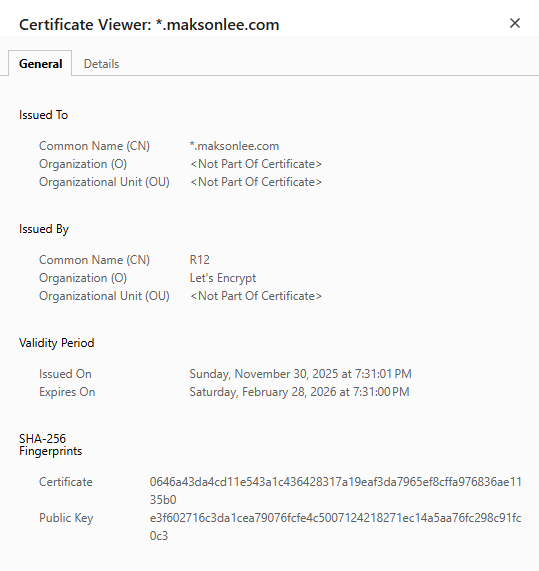
In a browser, open:
https://app1.maksonlee.comhttps://app2.maksonlee.com
and verify:
- Issuer: Let’s Encrypt
- Subject/SAN:
*.maksonlee.com
Any new app that:
- Uses
ingressClassName: traefik, and - Has a host under
*.maksonlee.com
will automatically be served over HTTPS with this wildcard certificate, without adding:
- A
tls:section to its Ingress, or - A per-namespace Certificate resource.
- Summary
On your 3-node bare-metal HA cluster, you now have:
- Traefik exposed via MetalLB at
192.168.0.98on ports 80/443. - cert-manager managing Let’s Encrypt staging + production issuers.
- A production wildcard
*.maksonlee.comcertificate stored intraefik/wildcard-maksonlee-com-tls. - Traefik configured to:
- Redirect HTTP→HTTPS globally.
- Use the wildcard certificate as the default TLS certificate.
Result:
https://app1.maksonlee.comhttps://app2.maksonlee.com- and any future
https://*.maksonlee.comfronted by Traefik
are automatically secured by the same Let’s Encrypt wildcard certificate, with cert-manager handling renewals and DNS-01 challenges via Cloudflare in the background.
Did this guide save you time?
Support this site