
I already have Backstage running on Ubuntu 24.04 with:
- Keycloak OIDC login
- Users & groups synced from LDAP (OpenDJ) via
ldapOrg - Backstage backend running directly from source (no Docker) using production configuration (public URLs + OIDC + LDAP) while still using
yarn --cwd packages/backend start.
The next step is:
I don’t want to click “Register existing component” for every new repo. Backstage should just find repos that have catalog-info.yaml and import them automatically.
In this post I:
- Configure Backstage to scan all GitHub repos under
maksonleeaccount. - Make it automatically import any repo that has a
catalog-info.yamlin its default branch.
No TechDocs here. Just discovery and the Software Catalog.
Environment
Backstage:
- URL:
https://backstage.maksonlee.com - Running from
~/homelab-backstage(no Docker) - Start Backstage using production configuration:
cd ~/homelab-backstage

# your existing env vars (GITHUB_TOKEN, AUTH_*, LDAP_BIND_PASSWORD, ...)
yarn --cwd packages/backend start \
  --config ../../app-config.yaml \
--config ../../app-config.production.yamlIdentity:
- Keycloak:
https://keycloak.maksonlee.com(realmmaksonlee.com) - LDAP base DN:
dc=maksonlee,dc=com(users/groups from OpenDJ)
GitHub:
- Account:
github.com/maksonlee - Several private repos, including
maksonlee/beepbeep
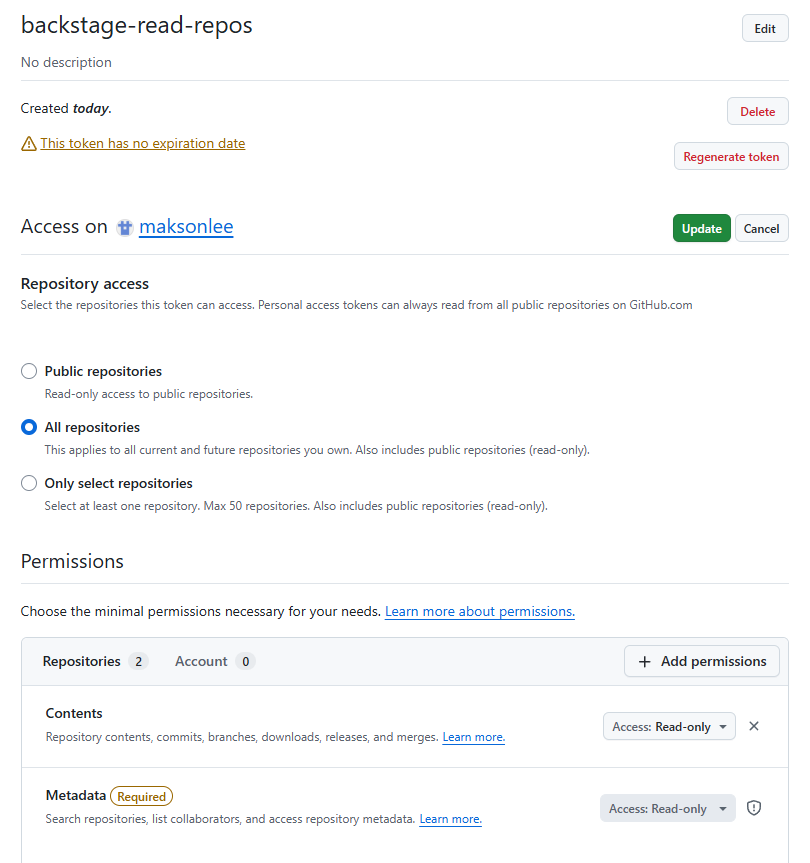
- Create a fine-grained GitHub PAT for Backstage
Backstage needs credentials to read private repos. For that I use a fine-grained Personal Access Token (PAT).
Short version:
- PAT = a token that GitHub issues to tools (like Backstage) instead of using your username/password.
- Fine-grained PAT = newer style where you can limit which repos and what permissions it has.
Logged in as maksonlee on GitHub:
- Go to
Settings → Developer settings → Personal access tokens → Fine-grained tokens → Generate new token. - Basic info:
- Token name:
backstage-read-repos - Resource owner:
maksonlee - Expiration: pick something sane (e.g. 90 days). For lab you can choose “No expiration”.
- Token name:
- Repository access:
- Choose All repositories.
- Repository permissions → Repositories:
- Contents:
Read-only - Metadata:
Read-only
- Contents:
- Click Generate token, copy the token string, and store it safely.
On the Backstage server I’ll expose it as GITHUB_TOKEN when starting the backend.
- Configure GitHub integration in Backstage
Tell Backstage to use GITHUB_TOKEN whenever it talks to github.com.
In ~/homelab-backstage/app-config.production.yaml, add (or edit) the top-level integrations.github block:
integrations:
  github:
    - host: github.com
token: ${GITHUB_TOKEN}This means:
- At runtime, Backstage reads the GitHub token from the
GITHUB_TOKENenv var. - All calls to
github.comfrom the backend use that token.
No extra configuration needed for non-Enterprise github.com.
- Add the GitHub catalog backend module
Next, I add the GitHub entity provider so the catalog can scan my repos.
- Install the module
On the Backstage host:
cd ~/homelab-backstage
yarn --cwd packages/backend add @backstage/plugin-catalog-backend-module-github- Register it in
packages/backend/src/index.ts
My backend uses createBackend() and already has catalog + LDAP:
// catalog plugin
backend.add(import('@backstage/plugin-catalog-backend'));
backend.add(
  import('@backstage/plugin-catalog-backend-module-scaffolder-entity-model'),
);

// LDAP org provider: sync Users & Groups from LDAP into the catalog
backend.add(import('@backstage/plugin-catalog-backend-module-ldap'));I insert the GitHub module between the catalog core and LDAP provider:
// catalog plugin
backend.add(import('@backstage/plugin-catalog-backend'));
backend.add(
  import('@backstage/plugin-catalog-backend-module-scaffolder-entity-model'),
);

// GitHub discovery provider: auto-import entities from GitHub repos
backend.add(import('@backstage/plugin-catalog-backend-module-github'));

// LDAP org provider: sync Users & Groups from LDAP into the catalog
backend.add(import('@backstage/plugin-catalog-backend-module-ldap'));All other plugins (app, proxy, auth, permission, search, kubernetes, notifications, signals, etc.) stay as they were.
- Configure GitHub discovery in
app-config.production.yaml
Now I configure a catalog provider that scans all repos under the maksonlee account.
In app-config.production.yaml I already had catalog configured for LDAP. I extend it with a github provider section:
catalog:
  providers:
    github:
      maksonlee:
        organization: 'maksonlee'
        catalogPath: '/catalog-info.yaml'
        filters:
          repository: '.*'
        schedule:
          frequency: { minutes: 30 }
timeout: { minutes: 3 }What this means:
github:– we’re configuring GitHub catalog providers.maksonlee:– this is just an ID for this provider (shows up in logs).organization: 'maksonlee'– scan all repos undergithub.com/maksonlee.catalogPath: '/catalog-info.yaml'– in each repo’s default branch, look for/catalog-info.yaml.filters.repository: '.*'– include all repo names (can be narrowed later).schedule.frequency: 30 minutes– refresh every 30 minutes.schedule.timeout: 3 minutes– give the job up to 3 minutes to run.
Important: I don’t set any branch filter. The provider always uses each repo’s default branch (whether that’s main or master).
- Restart the backend and confirm discovery is running
Now I restart Backstage with GITHUB_TOKEN set:
cd ~/homelab-backstage

# keep your existing env vars (GITHUB_TOKEN, AUTH_*, LDAP_BIND_PASSWORD, ...)
GITHUB_TOKEN='your-fine-grained-pat' \
yarn --cwd packages/backend start \
  --config ../../app-config.yaml \
--config ../../app-config.production.yamlIn the logs I see:
{"level":"info","message":"Registered scheduled task: github-provider:maksonlee:refresh, {\"version\":2,\"cadence\":\"PT30M\",\"timeoutAfterDuration\":\"PT3M\"}","plugin":"catalog","service":"backstage","task":"github-provider:maksonlee:refresh"}
...
{"class":"GithubEntityProvider","level":"info","message":"Read 74 GitHub repositories (74 matching the pattern)","plugin":"catalog","service":"backstage","target":"github-provider:maksonlee","taskId":"github-provider:maksonlee:refresh","taskInstanceId":"..."}This tells me:
- The scheduled task
github-provider:maksonlee:refreshis registered. - It successfully enumerated my repos (
Read 74 GitHub repositoriesin my case).
At this point Backstage is scanning GitHub correctly. Now I just need catalog-info.yaml files in repos that I want in the Catalog.
- Use one repo as the concrete example
I use maksonlee/beepbeep (a private Android app) as the test case.
Goal: once I add catalog-info.yaml to its default branch, it should show up in the Catalog automatically, without any UI registration.
In the root of the default branch (master for this repo), I create:
apiVersion: backstage.io/v1alpha1
kind: Component
metadata:
  name: beepbeep
  title: Beep Beep
  description: Minimal periodic reminder app with time-based sounds and quiet hours.
  annotations:
    github.com/project-slug: maksonlee/beepbeep
spec:
  type: service
  owner: user:default/maksonlee
lifecycle: productionNotes:
metadata.name: beepbeep→ entity reference becomescomponent:default/beepbeep.github.com/project-slug: maksonlee/beepbeep→ ties this entity back to the GitHub repo.owner: user:default/maksonlee→ I own the app as a user entity (synced from LDAP).
Commit:
git add catalog-info.yaml
git commit -m "chore(backstage): add catalog-info.yaml for Beep Beep"
git pushNo Backstage UI action required. I just wait for the provider to refresh (or restart the backend once more if I’m impatient).
- Verify that repo appears in the Catalog
In the Backstage UI:
- Go to
https://backstage.maksonlee.com. - Click Catalog → Components.
I see:
- Name:
Beep Beep - Type:
service - Owner:
user:default/maksonlee
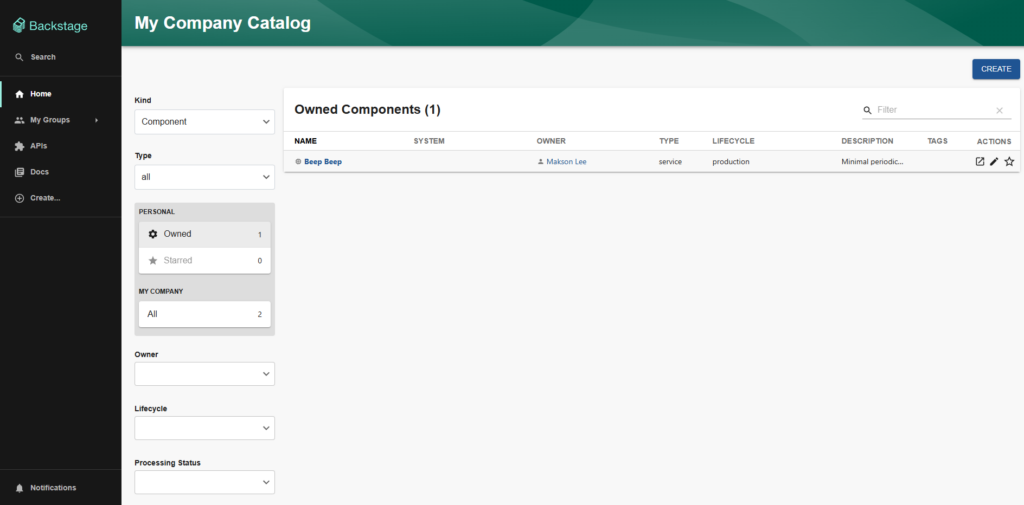
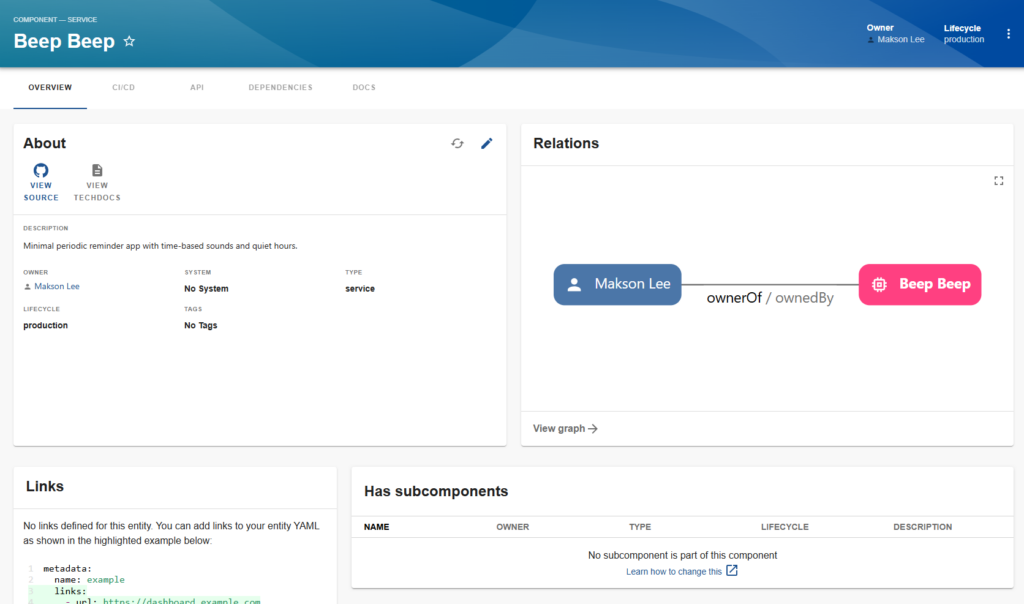
This confirms that:
- GitHub discovery is reading my repos.
- It found
catalog-info.yamlin the default branch. - It created
component:default/beepbeepautomatically.
No “Register component” button needed.
- Scaling to all repos
With this setup, the rule across my account is now:
If a repo under github.com/maksonlee has a catalog-info.yaml at the root of its default branch, and its name matches repository: '.*', it will appear in the Backstage Catalog automatically.
To onboard another repo:
In that repo’s default branch, add catalog-info.yaml, for example:
apiVersion: backstage.io/v1alpha1
kind: Component
metadata:
  name: my-service
  title: My Service
  description: Something useful.
  annotations:
    github.com/project-slug: maksonlee/my-service
spec:
  type: service
  owner: user:default/maksonlee
lifecycle: productionCommit and push:
git add catalog-info.yaml
git commit -m "chore(backstage): add catalog-info.yaml for My Service"
git pushWait for the GitHub provider to refresh, or restart the backend.
The new component appears automatically.
If I want to limit which repos are scanned, I can adjust:
filters:
repository: '.*'For example, only repos starting with android-:
filters:
repository: '^android-.*'Or I can define multiple providers (e.g. one per pattern or per org) under catalog.providers.github.
- Summary
With a small amount of config, Backstage now auto-discovers GitHub repos using the default branch and a fine-grained PAT:
- Created a fine-grained PAT
backstage-read-reposwith Contents: Read-only and Metadata: Read-only for all repos undermaksonlee. - Configured
integrations.githubto use${GITHUB_TOKEN}forgithub.com. - Installed and registered
@backstage/plugin-catalog-backend-module-githubin the backend. - Added
catalog.providers.github.maksonleeto scan all repos undermaksonlee, looking for/catalog-info.yamlin the default branch. - Onboarded a private repo (
maksonlee/beepbeep) by adding a singlecatalog-info.yamlfile and committing it. - Verified that Beep Beep appears in the Catalog automatically, with no manual registration.
From now on, onboarding a service into Backstage for this account is just:
Add catalog-info.yaml to the default branch → wait for refresh → done.
Did this guide save you time?
Support this site