
This post shows how to auto-ingest Backstage catalog entities from Gerrit using the official Gerrit Discovery entity provider. The provider uses Gerrit’s “List Projects” API to find matching projects, then reads your catalog YAMLs via Gitiles.
What I’m doing differently
A lot of examples assume each repo contains its own catalog-info.yaml at the repo root. The Gerrit discovery provider supports that, but my setup is different:
- I do not use a “central catalog repo”.
- I keep catalog YAMLs in a dedicated branch inside the existing
platform/manifestGerrit project:- project:
platform/manifest - branch:
backstage-catalog - files:
catalog/products/*.yaml
- project:
This is still “auto-discovery” because Backstage is pulling entities automatically from Gerrit (no manual “Register existing component”), but the catalog content lives in a central catalog branch instead of being scattered across many repos.
Prerequisites
- Backstage is already running (this guide assumes the new backend, which is the default since Backstage v1.24).
- Your Backstage backend can reach:
- Gerrit REST API (HTTPS)
- Gitiles web UI (HTTPS)
- Your Gerrit account (service account recommended) can read:
- the
platform/manifestproject - the
backstage-catalogbranch
- the
- You have Gerrit credentials:
GERRIT_USERNAMEGERRIT_TOKEN(or HTTP password/token—Backstage calls it “password”)
- Install the Gerrit discovery provider module
From your Backstage monorepo root:
yarn --cwd packages/backend add @backstage/plugin-catalog-backend-module-gerritThis module is not included by default, so you must install it.
- Enable the module in the backend
Edit packages/backend/src/index.ts and add:
backend.add(import('@backstage/plugin-catalog-backend-module-gerrit'));The Backstage docs show the same pattern (add the module to the backend).
- Configure the Gerrit integration
In app-config.production.yaml (or wherever you keep prod config), add:
integrations:
  gerrit:
    - host: gerrit.maksonlee.com
      baseUrl: https://gerrit.maksonlee.com

      # IMPORTANT: use YOUR Gitiles base URL
      # (some Gerrit setups use /plugins/gitiles, others use /gitiles)
      gitilesBaseUrl: https://gerrit.maksonlee.com/plugins/gitiles

      username: ${GERRIT_USERNAME}
password: ${GERRIT_TOKEN}Backstage’s Gerrit integration supports baseUrl, gitilesBaseUrl, and username/password (token is typically placed in password).
How to confirm gitilesBaseUrl is correct
- Open your Gitiles in a browser and copy the prefix before the project path.
- Example (mine):
https://gerrit.maksonlee.com/plugins/gitiles/<project>/+/...
→gitilesBaseUrlshould behttps://gerrit.maksonlee.com/plugins/gitiles
- Configure the Gerrit discovery provider
Now configure the catalog provider. The provider supports:
host: which Gerrit integration to usequery: passed directly to the List Projects APIbranch: where Backstage looks for catalog filescatalogPath: relative path (or glob) to your YAMLs (minimatch supported)
Here is the exact pattern I’m using:
catalog:
  providers:
    gerrit:
      platformManifestCatalog:
        host: gerrit.maksonlee.com
        query: 'state=ACTIVE&prefix=platform/manifest'

        # IMPORTANT:
        # Use the BRANCH NAME here (not refs/heads/...)
        branch: 'backstage-catalog'

        # Path is relative to repo root; glob is allowed.
        catalogPath: 'catalog/products/*.yaml'

        schedule:
          frequency: { minutes: 30 }
timeout: { minutes: 3 }Critical note about branch
Use backstage-catalog, not refs/heads/backstage-catalog.
If you include refs/heads/, you can end up with broken Gitiles URLs (often showing duplicated refs/heads/refs/heads/...) and Backstage will 404 when trying to read your YAMLs.
- Create the dedicated catalog branch and add YAMLs
In Gerrit, create a branch named:
backstage-catalogin projectplatform/manifest
Then add your catalog files under:
catalog/products/*.yaml
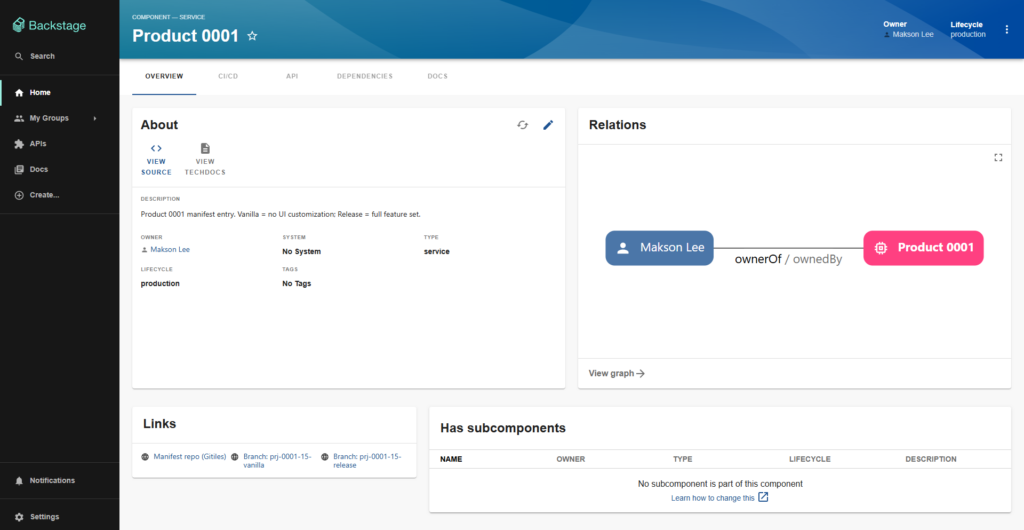
Example file: catalog/products/proj-0001.yaml
apiVersion: backstage.io/v1alpha1
kind: Component
metadata:
  name: proj-0001
  title: Product 0001
  description: Product 0001 manifest entry. Vanilla = no UI customization; Release = full feature set.
  links:
    - title: Manifest repo (Gitiles)
      url: https://gerrit.maksonlee.com/plugins/gitiles/platform/manifest
    - title: "Branch: prj-0001-15-vanilla"
      url: https://gerrit.maksonlee.com/plugins/gitiles/platform/manifest/+/refs/heads/prj-0001-15-vanilla
    - title: "Branch: prj-0001-15-release"
      url: https://gerrit.maksonlee.com/plugins/gitiles/platform/manifest/+/refs/heads/prj-0001-15-release
spec:
  type: service
  owner: user:default/maksonlee
lifecycle: production- Restart Backstage and verify ingestion
Make sure your env vars are set (however you manage prod env):
export GERRIT_USERNAME='...'
export GERRIT_TOKEN='...'Restart your backend (example):
yarn --cwd packages/backend start \
  --config ../../app-config.yaml \
--config ../../app-config.production.yamlWhat “success” looks like in logs
You should see a registered scheduled task like:
- gerrit-provider:platformManifestCatalog:refresh
Then Backstage should attempt to read your Gitiles URLs under the configured branch + path.
Did this guide save you time?
Support this site