
In previous posts,
I already have:
- Backstage running on Ubuntu 24.04 from source (no Docker) with Keycloak OIDC login
- Users & groups synced from LDAP (OpenDJ) into the Backstage catalog
- GitHub discovery so any repo under
maksonleewith acatalog-info.yamlis auto-imported
Now I want Backstage to show Jenkins CI/CD status directly in the CI/CD tab of each component.
In this post I:
- Use a dedicated Jenkins user
backstagewith an API token - Install the Jenkins plugin (frontend + backend) into my existing Backstage repo
- Configure Backstage to talk to
https://jenkins.maksonlee.com - Wire Jenkins into the CI/CD tab in
EntityPage.tsx - Create a Jenkins pipeline job
android/beepbeep-master-cifor the Beep Beep Android app - Annotate Beep Beep’s
catalog-info.yamlso its Jenkins builds appear in Backstage - Note a limitation: re-runs from Backstage are triggered as the
backstageservice account
No Docker. No Helm. Just editing the same Backstage repo from the earlier posts.
Environment
Backstage
- URL:
https://backstage.maksonlee.com - Host: Ubuntu Server 24.04
- Repo:
~/homelab-backstage - Auth: Keycloak OIDC
- Users & groups: synced from LDAP
- GitHub discovery: imports repos under
maksonleewith/catalog-info.yaml
In earlier posts I started the backend like this:
cd ~/homelab-backstage

GITHUB_TOKEN='xxx' \
AUTH_SESSION_SECRET='xxx' \
AUTH_OIDC_CLIENT_ID='backstage' \
AUTH_OIDC_CLIENT_SECRET='xxx' \
LDAP_BIND_PASSWORD='xxx' \
yarn --cwd packages/backend start \
  --config ../../app-config.yaml \
  --config ../../app-config.production.yaml
In this post I’ll extend that command with Jenkins env vars, but only after all code and config changes are done.
Jenkins
- URL:
https://jenkins.maksonlee.com - Jenkins user used by Backstage:
backstage - Auth: API token for
backstage
- Jenkins service account
backstageand API token
Backstage talks to Jenkins using a service account, not individual user logins.
I created a Jenkins user called backstage and gave it just enough permissions to:
- View the jobs I want to expose in Backstage
- Trigger builds for those jobs
Log in to Jenkins as the backstage user.
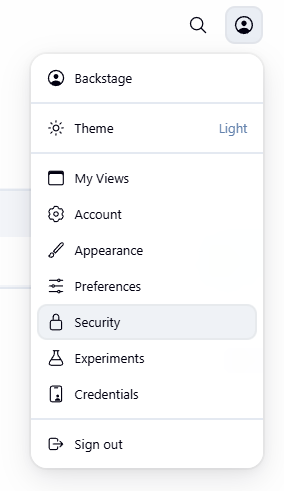
- Click the avatar in the top-right corner.
- In the dropdown, click Security.
You should see a page with sections like API Token, SSH Public Keys, Session Termination, and buttons for Save / Apply. - In the API Token section:
- Click Add new token.
- Enter a name, e.g.
backstage-integration. - Click Generate.
- Copy the token value once and store it in a password manager.
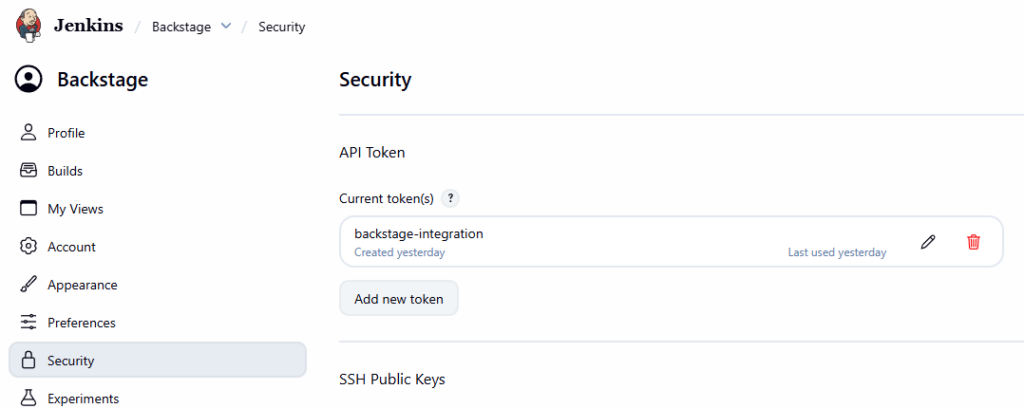
This token will become JENKINS_API_TOKEN for Backstage. I never commit it to Git.
- Install Jenkins plugins in Backstage
From the Backstage repo:
cd ~/homelab-backstage
- Frontend plugin
yarn --cwd packages/app add @backstage-community/plugin-jenkins
- Backend plugin
yarn --cwd packages/backend add @backstage-community/plugin-jenkins-backend
These add Jenkins support to the existing app. No extra containers.
- Register Jenkins backend module
Backend entrypoint: packages/backend/src/index.ts.
Before Jenkins, the tail of the file looked like this (simplified):
// kubernetes plugin
backend.add(import('@backstage/plugin-kubernetes-backend'));

// notifications and signals plugins
backend.add(import('@backstage/plugin-notifications-backend'));
backend.add(import('@backstage/plugin-signals-backend'));

backend.start();
I insert the Jenkins backend in the same style:
// kubernetes plugin
backend.add(import('@backstage/plugin-kubernetes-backend'));

// Jenkins CI/CD plugin
backend.add(import('@backstage-community/plugin-jenkins-backend'));

// notifications and signals plugins
backend.add(import('@backstage/plugin-notifications-backend'));
backend.add(import('@backstage/plugin-signals-backend'));

backend.start();
No new static imports are needed; everything is loaded through dynamic import().
- Configure Jenkins in
app-config.production.yaml
Next I give Backstage the Jenkins URL and credentials.
In app-config.production.yaml I add a top-level jenkins section:
jenkins:
  instances:
    - name: default
      baseUrl: https://jenkins.maksonlee.com
      username: ${JENKINS_USERNAME}
      apiKey: ${JENKINS_API_TOKEN}
      projectCountLimit: 250
      # crumbIssuer: true    # uncomment if your Jenkins requires CSRF crumbs
I keep JENKINS_USERNAME and JENKINS_API_TOKEN out of the file itself; they’re read from environment variables.
- Wire Jenkins into the CI/CD tab (
EntityPage.tsx)
The entity layout lives in packages/app/src/components/catalog/EntityPage.tsx.
- Add Jenkins imports
At the top of the file I already had:
import {
  EntityKubernetesContent,
  isKubernetesAvailable,
} from '@backstage/plugin-kubernetes';
I add:
import {
  EntityJenkinsContent,
  isJenkinsAvailable,
} from '@backstage-community/plugin-jenkins';
- Replace
cicdContent
Previously the CI/CD tab just showed “No CI/CD available for this entity”.
I replace that block with Jenkins support plus a fallback:
const cicdContent = (
  <EntitySwitch>
    {/* Jenkins: show builds when jenkins.io/job-full-name is present */}
    <EntitySwitch.Case if={isJenkinsAvailable}>
      <EntityJenkinsContent />
    </EntitySwitch.Case>

    {/* Fallback: no CI/CD annotation */}
    <EntitySwitch.Case>
      <EmptyState
        title="No CI/CD available for this entity"
        missing="info"
        description="To enable CI/CD for this component, configure a Jenkins job and add the jenkins.io/job-full-name annotation to its catalog-info.yaml."
        action={
          <Button
            variant="contained"
            color="primary"
            href="https://backstage.io/docs/features/software-catalog/well-known-annotations"
          >
            Read more
          </Button>
        }
      />
    </EntitySwitch.Case>
  </EntitySwitch>
);
My service and website layouts already had:
<EntityLayout.Route path="/ci-cd" title="CI/CD">
  {cicdContent}
</EntityLayout.Route>
so the CI/CD tab automatically becomes a Jenkins view whenever isJenkinsAvailable is true.
- Create Jenkins job
android/beepbeep-master-ci
Backstage doesn’t care how complex the job is; it just needs a Jenkins job whose path matches the annotation. For Beep Beep I want a simple CI pipeline that:
- Builds on every push to
master
Job naming
I use this naming pattern:
- Folder:
android - Job name:
beepbeep-master-ci
So the full Jenkins path is:
android/beepbeep-master-ci
Meaning:
android→ platformbeepbeep→ appmaster→ branchci→ continuous integration
What the job actually does
At a high level, the job:
- Pulls source from the
maksonlee/beepbeeprepo - Tracks the
masterbranch - Uses a
Jenkinsfilein the repo root to define the pipeline (checkout, tests, build, artifacts)
How you configure this in Jenkins (Pipeline from SCM vs Multibranch, exact Jenkinsfile content) doesn’t matter for Backstage, as long as:
- The job is reachable at
android/beepbeep-master-ci, and - It has builds.
- Annotate the Beep Beep component
Backstage needs to know which Jenkins job builds which component.
The annotation for that is:
jenkins.io/job-full-name: <folder>/<job>
For Beep Beep, my catalog-info.yaml in the repo looks like this:
apiVersion: backstage.io/v1alpha1
kind: Component
metadata:
  name: beepbeep
  title: Beep Beep
  description: Minimal periodic reminder app with time-based sounds and quiet hours.
  annotations:
    github.com/project-slug: maksonlee/beepbeep
    jenkins.io/job-full-name: android/beepbeep-master-ci
spec:
  type: service
  owner: user:default/maksonlee
  lifecycle: production
I commit and push this to GitHub.
Because GitHub discovery is already configured, Backstage automatically re-reads the catalog-info.yaml from the repo. I can also click the Refresh icon on the Beep Beep entity page to reload it immediately.
- Start / restart Backstage with Jenkins env vars
Run the backend with these two additional env vars (values come from your Jenkins service account):
From ~/homelab-backstage:
cd ~/homelab-backstage

# keep your existing env vars (GITHUB_TOKEN, AUTH_*, LDAP_BIND_PASSWORD, ...)
JENKINS_USERNAME='backstage' \
JENKINS_API_TOKEN='your-jenkins-api-token' \
yarn --cwd packages/backend start \
  --config ../../app-config.yaml \
  --config ../../app-config.production.yaml
On startup I expect logs like:
"Plugin initialization started: 'app', 'proxy', 'scaffolder', 'techdocs', 'auth', 'catalog', 'permission', 'search', 'kubernetes', 'jenkins', 'notifications', 'signals'"
"Initializing Jenkins backend","plugin":"jenkins","service":"backstage"
"Serving static app content from /home/administrator/homelab-backstage/packages/app/dist","plugin":"app","service":"backstage"
which confirms Jenkins config and plugin are both wired correctly.
- Verify in Backstage
With everything wired:
- Make sure
android/beepbeep-master-cihas at least one build in Jenkins. - Open
https://backstage.maksonlee.com. - Go to Catalog → Beep Beep (
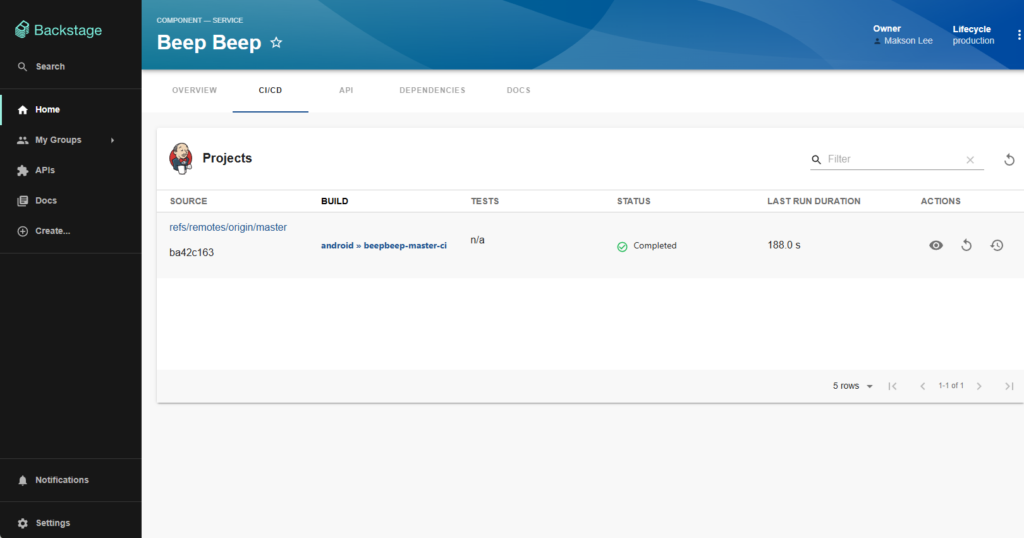
component:default/beepbeep). - Click the CI/CD tab.
Expected result:
- A list of recent Jenkins builds for
android/beepbeep-master-ci - Status, build number, commit, author, timestamps
- Links back to Jenkins
- Limitation: builds are triggered as
backstage(service account)
Important detail: all Jenkins calls from Backstage use the credentials defined in the jenkins.instances section:
jenkins:
  instances:
    - name: default
      baseUrl: https://jenkins.maksonlee.com
      username: ${JENKINS_USERNAME}   # backstage
      apiKey: ${JENKINS_API_TOKEN}
That means:
- When a user clicks Re-run in the Backstage CI/CD tab, the build in Jenkins is started as user
backstage, not as the real human (e.g.maksonlee). - Jenkins will log something like: “Started by remote user backstage”.
Backstage itself knows which Keycloak user clicked the button, but that identity is not propagated into Jenkins by default. The plugin is built around a service account model.
Did this guide save you time?
Support this site