
The previous ESP32 project sent DHT11 readings to ThingsBoard over MQTT with X.509 authentication. This version starts from its idf-6.x revision, commit 0458252 and uses LwM2M 1.1 over DTLS with the Anjay client library.
BLE Wi-Fi provisioning, BOOT reprovisioning, certificate storage, and the temperature and humidity telemetry keys remain unchanged.
Lab Context
- Original ESP32 with 4 MiB flash and DHT11 data on GPIO 23
- ESP-IDF 6.1 and Anjay 3.15.0
- ThingsBoard CE 4.4.0 with PR #16179
- RSA device certificate and ECDSA server certificate
- Linux build machine
For automatic device creation on 4.4.0, apply the PR changes to both the ThingsBoard core and LwM2M transport.
Replace thingsboard.example.com and esp32-dht11-01 with your server and device identity. Screenshots use example values.
1. Prepare the Device Certificate Files
Reuse a valid device certificate that allows TLS client authentication. For certificate issuance, see the EJBCA device certificate guide.
Prepare a private directory containing:
device-bundle/
├── device.crt          # Device certificate, intermediate(s), then root
├── device.key          # Matching device private key
├── root_ca.crt         # Trust anchors for the LwM2M server
└── provisioning.pop # BLE proof of possessionThingsBoard must trust the CA that issued device.crt; the ESP32’s root_ca.crt must trust the server certificate. These may be different CAs.
Keep the existing PoP when updating a device. Set the directory permissions to 0700 and the private key and PoP to 0600; keep the bundle outside the repository.
2. Enable the ThingsBoard LwM2M Listener
On a native Ubuntu installation, edit /etc/thingsboard/conf/thingsboard.conf and add or update:
export LWM2M_ENABLED=true
export LWM2M_ENABLED_BS=false
export LWM2M_BIND_ADDRESS=127.0.0.1
export LWM2M_SECURITY_BIND_ADDRESS=0.0.0.0
export LWM2M_SECURITY_BIND_PORT=5686
export LWM2M_SERVER_CREDENTIALS_ENABLED=true
export LWM2M_SERVER_CREDENTIALS_TYPE=PEM
export LWM2M_SERVER_PEM_CERT=/etc/thingsboard/lwm2m/server-chain.pem
export LWM2M_SERVER_PEM_KEY=/etc/thingsboard/lwm2m/server-key.pem
export LWM2M_SERVER_PEM_KEY_PASSWORD=''
export TB_LWM2M_SERVER_SECURITY_SKIP_VALIDITY_CHECK_FOR_CLIENT_CERT=false
export LWM2M_TRUST_CREDENTIALS_ENABLED=true
export LWM2M_TRUST_CREDENTIALS_TYPE=PEM
export LWM2M_TRUST_PEM_CERT=/etc/thingsboard/lwm2m/device-root-ca.pemReplace the paths with your files:
server-chain.pem: ECDSA server certificate and its chainserver-key.pem: matching server private keydevice-root-ca.pem: trusted CA certificate for device authentication
The ECDSA certificate must match the hostname in the firmware URI. Allow the ThingsBoard service to read these files and restrict access to the unencrypted private key. See the LwM2M server setup guide for certificate configuration.
Restart the service and check the listener:
sudo systemctl restart thingsboard
sudo systemctl status thingsboard --no-pager
sudo ss -lunp 'sport = :5686'Allow UDP 5686 from the device network.
3. Configure the Device Profile and Identity
Sign in as a tenant administrator. The certificate Common Name (CN), ThingsBoard endpoint, firmware endpoint, and --device-name must match: esp32-dht11-01 in this example.
If automatic creation will use the MQTT profile’s CA, disable provisioning on that profile first. Under Profiles → Device profiles, edit the profile, set Device provisioning → Provision strategy: Disabled, and click Apply changes. A CA can belong to only one provisioning profile.
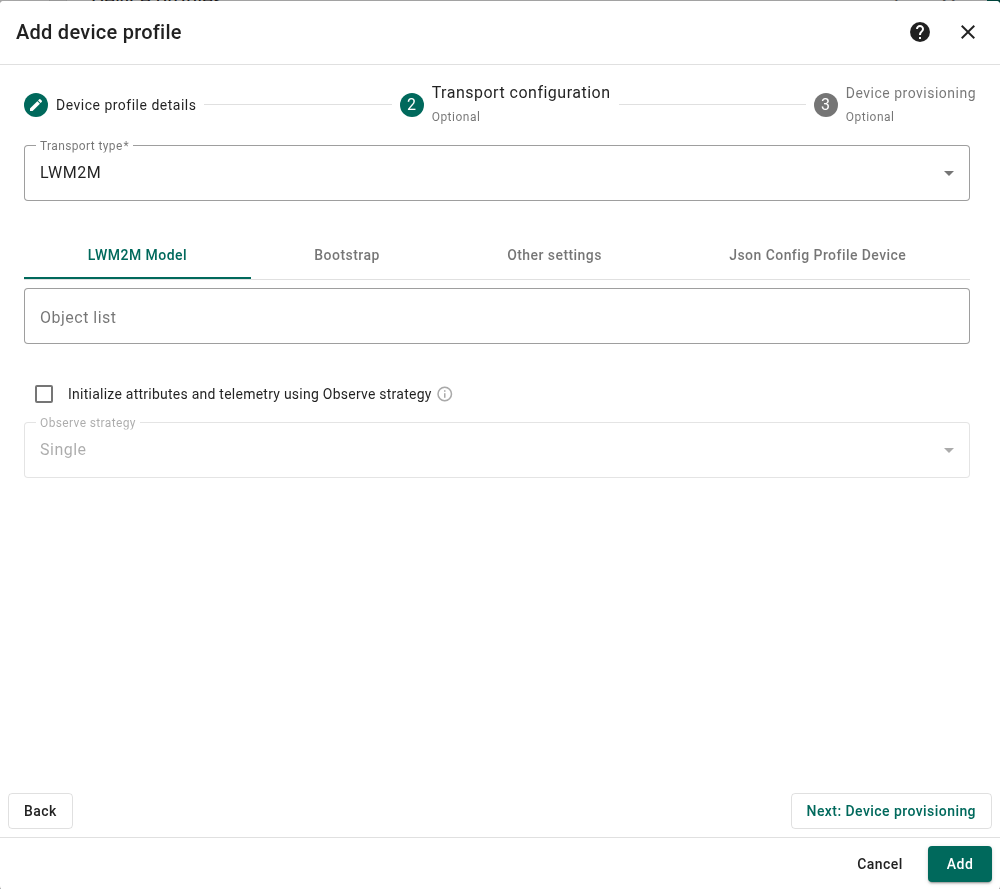
Under Profiles → Device profiles, click + and choose Create new device profile.
- Device profile details: enter
ESP32 DHT11 LwM2Mas the Name, then click Next: Transport configuration. - Transport configuration: select Transport type: LWM2M. Keep the remaining settings at their defaults.
- Click Next: Device provisioning and choose the appropriate path below.
Keep the Existing MQTT Device
Leave Provision strategy: Disabled and click Add. Under Entities → Devices, edit the existing device’s Device profile to ESP32 DHT11 LwM2M and click the checkmark (Apply changes). This preserves the device’s telemetry history and dashboard bindings.
Convert its MQTT credentials through the REST API:
- Copy the device ID from its details page and open
https://thingsboard.example.com/swagger-ui.htmlin the same logged-in browser. Under device-controller, run GET /api/device/{deviceId}/credentials. - Copy the response into POST /api/device/credentials. Replace only the three fields below, preserving
id,deviceId,version, and all other fields. Keep the escaped quotes in thecredentialsValuestring.
{
  "credentialsType": "LWM2M_CREDENTIALS",
  "credentialsId": "esp32-dht11-01",
  "credentialsValue": "{\"client\":{\"endpoint\":\"esp32-dht11-01\",\"securityConfigClientMode\":\"X509\",\"cert\":\"\"},\"bootstrap\":{\"bootstrapServer\":{\"securityMode\":\"NO_SEC\"},\"lwm2mServer\":{\"securityMode\":\"NO_SEC\"}}}"
}Click Execute, then repeat GET to verify the result. The empty cert uses the server’s trusted device CA. Keep the required bootstrap entries even though the firmware does not use them.
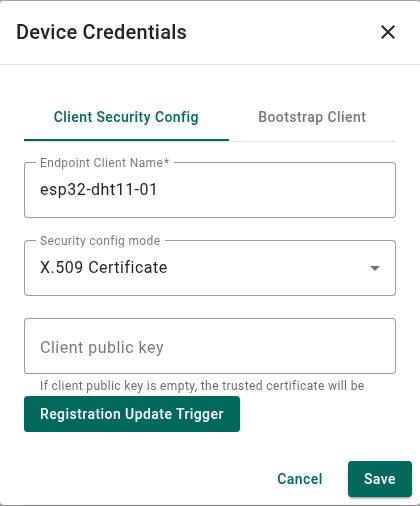
In Manage credentials → Client Security Config, check Endpoint Client Name: esp32-dht11-01, Security config mode: X.509 Certificate, and an empty Client public key.
Automatically Create New Devices
In the new profile’s Device provisioning step, set:
- Provision strategy: X509 Certificates Chain
- Create new devices: enabled
- Certificate in PEM format: the device CA certificate
- CN Regular Expression variable:
(.+)
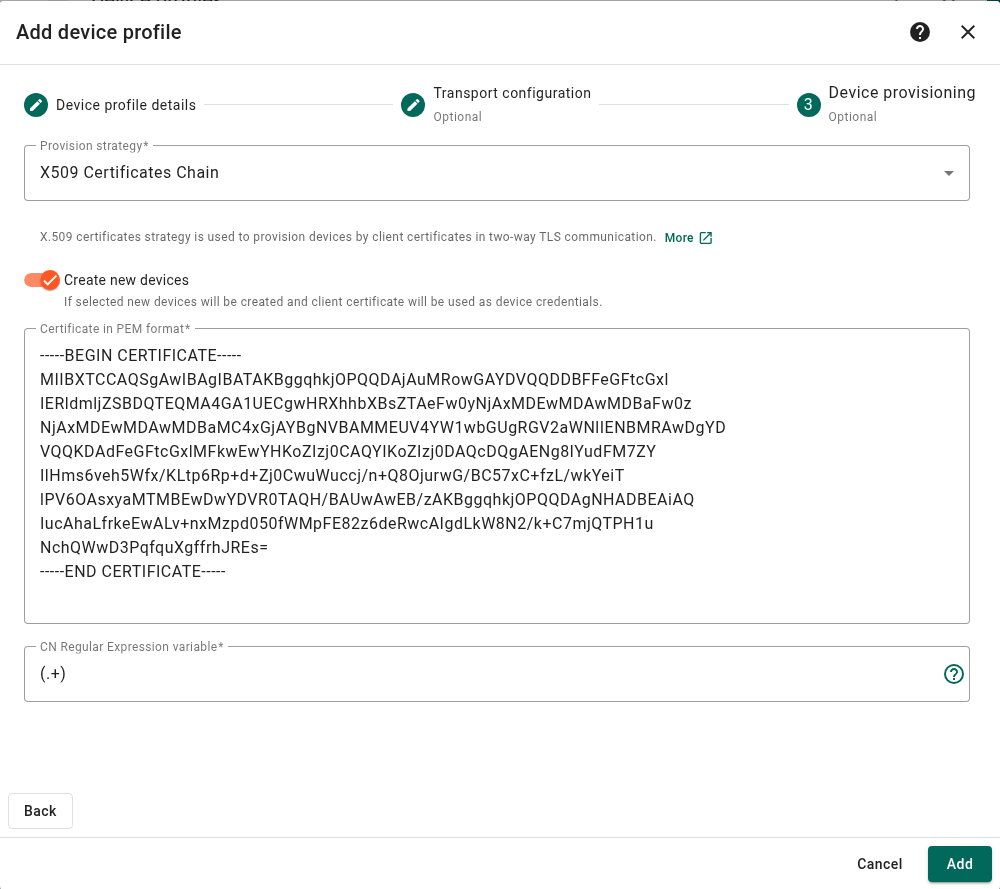
Click Add. On the first connection from an unregistered device, ThingsBoard creates its record and LwM2M X.509 credentials, using the CN as its name. The device’s certificate chain must include the CA entered above.
4. Map the Sensor Resources to Telemetry
Map Temperature 3303 and Humidity 3304, both version 1.1, instance 0, using thingsboard/telemetry-mapping.json:
{
  "keyName": {
    "/3303_1.1/0/5700": "temperature",
    "/3304_1.1/0/5700": "humidity"
  },
  "attribute": [],
  "telemetry": ["/3303_1.1/0/5700", "/3304_1.1/0/5700"],
  "observe": ["/3303_1.1/0", "/3304_1.1/0"],
  "attributeLwm2m": {},
  "observeStrategy": "SINGLE",
  "initAttrTelAsObsStrategy": false
}Use the ThingsBoard REST API to save this mapping and for later changes; the 4.4 model editor does not preserve instance-level Observe paths. In Swagger UI:
- Open
https://thingsboard.example.com/swagger-ui.htmlin the same logged-in browser. - Under device-profile-controller, run GET /api/deviceProfile/{deviceProfileId} using the profile ID from its URL.
- Copy the response into POST /api/deviceProfile. Replace only
profileData.transportConfiguration.observeAttrwith the JSON above. Keep the existingidand all other fields. - Click Execute, then repeat the GET request to check the saved mapping.
Instance-level Observe includes Timestamp 5518, so unchanged readings still trigger notifications. Only temperature and humidity are stored as telemetry.
5. Prepare and Build the Firmware
On the Linux build machine, activate ESP-IDF 6.1. Git, CMake, Ninja, and OpenSSL 3 must also be installed.
Clone LwM2M firmware commit 73bb976 and prepare Anjay with its ESP-IDF 6.1 compatibility patches:
git clone https://github.com/maksonlee/esp32-ble-lwm2m-x509-thingsboard.git
cd esp32-ble-lwm2m-x509-thingsboard
git checkout --detach 73bb976efbc247760394bc64fdfc5695cd94e5d6
python tools/prepare_anjay.py
idf.py set-target esp32
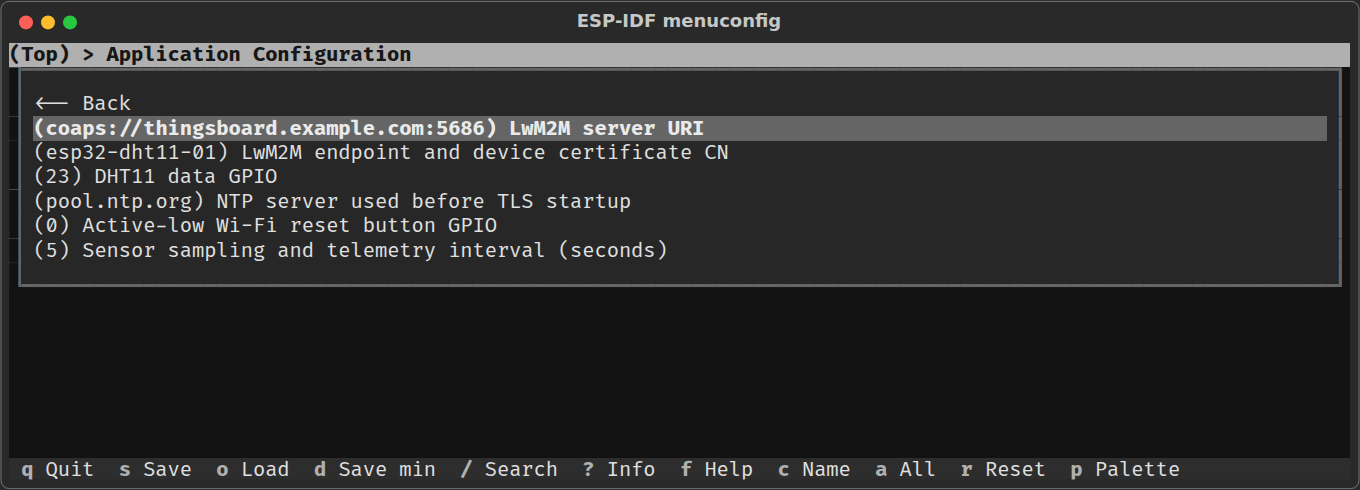
idf.py menuconfigUnder Application Configuration, set:
- LwM2M server URI:
coaps://thingsboard.example.com:5686 - LwM2M endpoint:
esp32-dht11-01 - DHT11 data GPIO:
23 - Telemetry interval:
5seconds - Time server: a reachable NTP server for clock synchronization before DTLS
Save, then build:
idf.py buildLicense: the application is MIT; Anjay and avs_coap use AVSystem’s Non-Commercial License. Commercial use requires a separate AVSystem license. See THIRD_PARTY_NOTICES.md.
6. Flash the ESP32
Check the certificate bundle:
python tools/device.py check --device-name esp32-dht11-01 \
--certs-dir /private/device-bundleConnect the board and read its MAC:
python -m esptool --chip esp32 --port /dev/ttyUSB0 read-macReplace YOUR_BOARD_MAC with the reported MAC and adjust the bundle path and serial port:
python tools/device.py flash --device-name esp32-dht11-01 \
  --certs-dir /private/device-bundle \
--port /dev/ttyUSB0 --expected-mac YOUR_BOARD_MACFlashing updates the firmware and certificate bundle while preserving saved Wi-Fi settings. For a new bundle without a PoP, add --generate-pop.
Private keys are stored in plaintext SPIFFS; Secure Boot and Flash Encryption are not enabled. See the security notes.
For BLE enrollment or BOOT reprovisioning, follow the firmware instructions.
7. Verify Registration and Telemetry
Open the serial monitor:
idf.py -p /dev/ttyUSB0 monitorLook for Wi-Fi connection, time synchronization, LwM2M registration, and successful sensor readings.
In ThingsBoard, open the device’s Latest telemetry. Check that temperature and humidity receive new timestamps about every five seconds, even when the values stay the same.
For automatic creation, confirm that the new device appears under the LwM2M profile. Restart the board and check that it reconnects to the same device record.
To read temperature directly, enter this in ThingsBoard’s RPC Debug Terminal:
Read {"id":"/3303/0/5700"}Use /3304/0/5700 to read humidity. See the LwM2M RPC reference for other commands.