
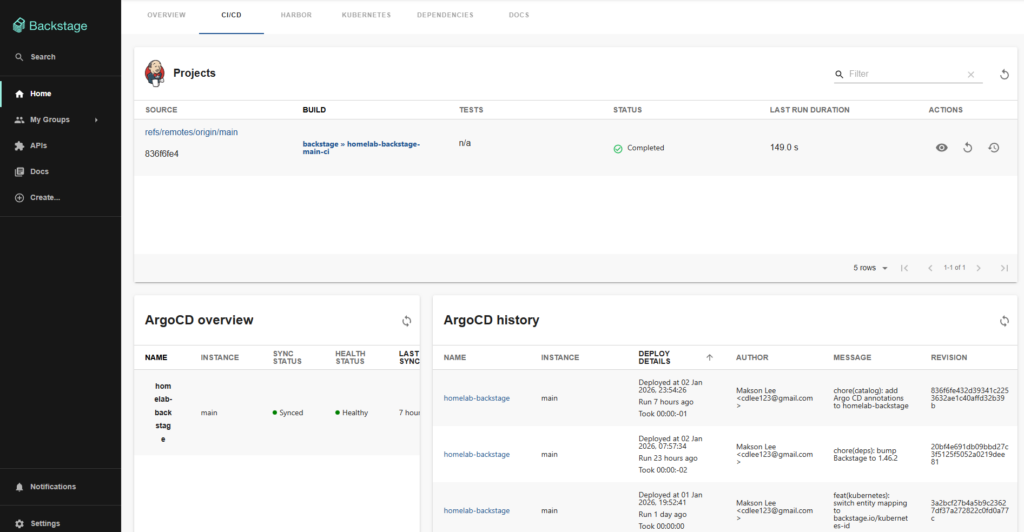
This post adds Argo CD deployment visibility to your Backstage entity pages without creating a new tab. Instead, Argo CD widgets (Overview + History) appear inside your existing CI/CD tab, alongside your current CI view (for example Jenkins).
What you’ll do
- Install the Roadie Argo CD plugin (frontend + backend)
- Configure your Argo CD instance in Backstage config (
app-config.production.yaml) - Create a dedicated read-only Argo CD API account and generate a token
- Provide one required env var:
ARGOCD_AUTH_TOKEN - Add Argo CD widgets into your existing CI/CD tab
- Map a Backstage Component to an Argo CD Application using annotations
Prerequisites
- A working Backstage app
- A reachable Argo CD server URL
- Argo CD CLI access (for generating a token)
- Install the Argo CD plugin packages
Run:
yarn --cwd packages/app add @roadiehq/backstage-plugin-argo-cd
yarn --cwd packages/backend add @roadiehq/backstage-plugin-argo-cd-backend- Enable the Argo CD backend plugin
Add the backend plugin to packages/backend/src/index.ts:
diff --git a/packages/backend/src/index.ts b/packages/backend/src/index.ts
index 5086daa..f97e8c9 100644
--- a/packages/backend/src/index.ts
+++ b/packages/backend/src/index.ts
@@ -12,6 +12,7 @@ const backend = createBackend();

 backend.add(import('@backstage/plugin-app-backend'));
 backend.add(import('@backstage/plugin-proxy-backend'));
+backend.add(import('@roadiehq/backstage-plugin-argo-cd-backend'));

 // scaffolder plugin
backend.add(import('@backstage/plugin-scaffolder-backend'));- Configure your Argo CD instance in
app-config.production.yaml
Add an argocd: section that defines your instance URL and the token variable:
diff --git a/app-config.production.yaml b/app-config.production.yaml
index a846c08..c377eb6 100644
--- a/app-config.production.yaml
+++ b/app-config.production.yaml
@@ -159,3 +159,11 @@ proxy:
       secure: true
       headers:
         accept: application/json
+
+argocd:
+  appLocatorMethods:
+    - type: config
+      instances:
+        - name: main
+          url: https://argocd.maksonlee.com
+ token: ${ARGOCD_AUTH_TOKEN}- Create a dedicated Argo CD API account + RBAC (read-only) and generate a token
- Create a local Argo CD account that can issue API keys
kubectl edit cm argocd-cm -n argocdAdd:
data:
accounts.backstage-admin: apiKey- Grant read-only RBAC permissions
kubectl edit cm argocd-rbac-cm -n argocdAdd:
data:
  policy.csv: |
    p, role:backstage-read-only, applications, get, */*, allow
g, backstage-admin, role:backstage-read-only- (If needed) restart Argo CD server to reload ConfigMaps
Often not required, but if you still get 403/permission issues after edits:
kubectl rollout restart deploy/argocd-server -n argocd- Generate the token for the Backstage account
Generate a token via Argo CD CLI:
argocd login argocd.maksonlee.com
argocd account generate-token --account backstage-adminCopy the printed token string — that’s what you’ll set as ARGOCD_AUTH_TOKEN.
- Required env variable
You must provide: ARGOCD_AUTH_TOKEN
- Token format (important)
Use a raw token string.
Good:
eyJhbGciOiJIUzI1NiIsInR5cCI6IkpXVCJ9....Bad:
argocd.token=eyJhbGciOiJIUzI1NiIs...Quick sanity check:
curl -sk -o /dev/null -w "code=%{http_code}\n" \
  -H "Authorization: Bearer ${ARGOCD_AUTH_TOKEN}" \
https://argocd.maksonlee.com/api/v1/applicationsYou want:
code=200- Show Argo CD widgets inside the existing CI/CD tab
You need to modify the file that defines your entity page routes / CI/CD tab content (many Backstage repos call it something like EntityPage.tsx, but the location can differ).
Example change:
diff --git a/packages/app/src/components/catalog/EntityPage.tsx b/packages/app/src/components/catalog/EntityPage.tsx
index f7439db..d31e5ad 100644
--- a/packages/app/src/components/catalog/EntityPage.tsx
+++ b/packages/app/src/components/catalog/EntityPage.tsx
@@ -54,6 +54,11 @@ import { ReportIssue } from '@backstage/plugin-techdocs-module-addons-contrib';
 import { EntityKubernetesContent, isKubernetesAvailable } from '@backstage/plugin-kubernetes';

 import { EntityJenkinsContent, isJenkinsAvailable } from '@backstage-community/plugin-jenkins';
+import {
+  EntityArgoCDOverviewCard,
+  EntityArgoCDHistoryCard,
+  isArgocdAvailable,
+} from '@roadiehq/backstage-plugin-argo-cd';

 import { EntityArtifactoryBrowserContent } from '@internal/backstage-plugin-artifactory-browser';
 import { EntityHarborArtifactsTab } from '@internal/backstage-plugin-harbor';
@@ -73,28 +78,45 @@ const techdocsContent = (
 );

 const cicdContent = (
-  <EntitySwitch>
-    <EntitySwitch.Case if={isJenkinsAvailable}>
-      <EntityJenkinsContent />
-    </EntitySwitch.Case>
-
-    <EntitySwitch.Case>
-      <EmptyState
-        title="No CI/CD available for this entity"
-        missing="info"
-        description="To enable CI/CD for this component, configure a Jenkins job and add the jenkins.io/job-full-name annotation to its catalog-info.yaml. You can read more about annotations in Backstage by clicking the button below."
-        action={
-          <Button
-            variant="contained"
-            color="primary"
-            href="https://backstage.io/docs/features/software-catalog/well-known-annotations"
-          >
-            Read more
-          </Button>
-        }
-      />
-    </EntitySwitch.Case>
-  </EntitySwitch>
+  <Grid container spacing={3} alignItems="stretch">
+    {/* Jenkins (existing CI view) */}
+    <Grid item xs={12}>
+      <EntitySwitch>
+        <EntitySwitch.Case if={isJenkinsAvailable}>
+          <EntityJenkinsContent />
+        </EntitySwitch.Case>
+
+        <EntitySwitch.Case>
+          <EmptyState
+            title="No CI/CD available for this entity"
+            missing="info"
+            description="To enable CI/CD for this component, configure a Jenkins job and add the jenkins.io/job-full-name annotation to its catalog-info.yaml. You can read more about annotations in Backstage by clicking the button below."
+            action={
+              <Button
+                variant="contained"
+                color="primary"
+                href="https://backstage.io/docs/features/software-catalog/well-known-annotations"
+              >
+                Read more
+              </Button>
+            }
+          />
+        </EntitySwitch.Case>
+      </EntitySwitch>
+    </Grid>
+
+    {/* Argo CD (GitOps / CD view) */}
+    <EntitySwitch>
+      <EntitySwitch.Case if={isArgocdAvailable}>
+        <Grid item xs={12} md={4}>
+          <EntityArgoCDOverviewCard />
+        </Grid>
+        <Grid item xs={12} md={8}>
+          <EntityArgoCDHistoryCard />
+        </Grid>
+      </EntitySwitch.Case>
+    </EntitySwitch>
+  </Grid>
);- Map a Backstage Component to an Argo CD Application (annotations)
Add annotations to the Component’s catalog-info.yaml:
argocd/app-name: <your-argocd-app-name>(single app)- Optional:
argocd/instance-name: main(only needed if you have multiple instances)
diff --git a/catalog-info.yaml b/catalog-info.yaml
index a8abe33..164d342 100644
--- a/catalog-info.yaml
+++ b/catalog-info.yaml
@@ -8,6 +8,8 @@ metadata:
   annotations:
     jenkins.io/job-full-name: backstage/homelab-backstage-main-ci
+    argocd/app-name: homelab-backstage
+ argocd/instance-name: main- Restart Backstage and verify
- Restart Backstage with
ARGOCD_AUTH_TOKENset. - Open Catalog → Component → CI/CD.
- You should see:
- Jenkins content (existing)
- Argo CD Overview card
- Argo CD History card
Did this guide save you time?
Support this site