In a previous post,
I installed Backstage on Ubuntu 24.04, wired it to Keycloak for OIDC login, and ran it directly from source (no Docker, minimal code changes):
- Backstage UI:
https://backstage.maksonlee.com - Keycloak:
https://keycloak.maksonlee.com(realmmaksonlee.com)
In this follow-up, I:
- Keep Keycloak for SSO (OIDC login).
- Make Backstage users and groups come from LDAP (OpenDJ) via the official
ldapOrgprovider. - Run the Backstage backend using production configuration (public URLs + OIDC + LDAP) while still using
packages/backend start(the standard dev runner).
Architecture
Components:
- LDAP (OpenDJ)
- Base DN:
dc=maksonlee,dc=com - Users:
ou=people,dc=maksonlee,dc=com - Service accounts:
ou=system,dc=maksonlee,dc=com - Groups:
ou=organization,ou=groups,dc=maksonlee,dc=com
- Base DN:
- Keycloak
- Realm:
maksonlee.com - Backstage client:
backstage(confidential) - Uses LDAP as user federation provider (user data ultimately lives in LDAP).
- Realm:
- Backstage
- URL:
https://backstage.maksonlee.com - Backend DB: SQLite (better-sqlite3) in
/var/lib/backstage/db - Authentication: OIDC via Keycloak
- Organization:
UserandGroupentities imported from LDAP withldapOrg.
- URL:
Flow:
- User logs in to Backstage using Keycloak.
- Keycloak authenticates against LDAP and returns an OIDC token with
email. - Backstage uses
emailMatchingUserEntityProfileEmailto map that email to aUserentity in the catalog. - That
Userentity (and itsGroupmemberships) are synced from LDAP.
Why sync from LDAP instead of Keycloak?
In my setup:
- LDAP (OpenDJ) is the real source of truth for users and groups.
- Keycloak is configured to use LDAP as its user provider (user federation).
That means the chain is already:
LDAP → Keycloak (for login)
If I also synced org data from Keycloak, I’d effectively have:
LDAP → Keycloak → Backstage
Backstage ships with a first-party LDAP org provider, so it’s simpler and more direct to:
- Sync
UserandGroupentities straight from LDAP, and - Use Keycloak only for OIDC (authentication + tokens).
In other words:
LDAP owns directory data,
Keycloak owns authentication,
Backstage ties them together.
LDAP layout details
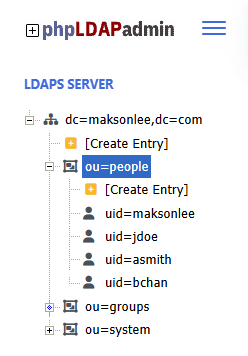
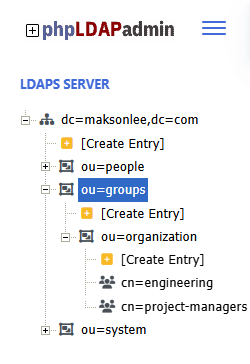
My directory tree looks like this:
- Base DN
dc=maksonlee,dc=com - Users
ou=people,dc=maksonlee,dc=com- Object class:
inetOrgPerson - Example users:
uid=maksonleeuid=jdoeuid=asmithuid=bchan
- Key attributes:
uidcnmailisMemberOf(contains group DNs)
- Object class:
- Service accounts
ou=system,dc=maksonlee,dc=com- Example:
uid=backstage,uid=jenkins, …
- Example:
- Groups
ou=organization,ou=groups,dc=maksonlee,dc=com- Object class:
groupOfNames - Example:
cn=engineering,cn=project-managers - Membership attribute:
member(DNs of users)
- Object class:
We’ll map:
- Users:
uid→metadata.name,cn→ display name,mail→ email. - Groups: cn → metadata.name, member → spec.children.
Backstage & Keycloak recap
In app-config.production.yaml I already had:
app:
  baseUrl: https://backstage.maksonlee.com

backend:
  baseUrl: https://backstage.maksonlee.com
  listen: '127.0.0.1:7007'
  database:
    client: better-sqlite3
    connection:
      directory: /var/lib/backstage/db

auth:
  environment: production
  session:
    secret: ${AUTH_SESSION_SECRET}
  providers:
    oidc:
      production:
        metadataUrl: https://keycloak.maksonlee.com/realms/maksonlee.com/.well-known/openid-configuration
        clientId: ${AUTH_OIDC_CLIENT_ID}
        clientSecret: ${AUTH_OIDC_CLIENT_SECRET}
        additionalScopes:
          - profile
          - email
        prompt: auto
        signIn:
          resolvers:
- resolver: emailMatchingUserEntityProfileEmailI reuse this exactly as-is; I only add LDAP as a catalog provider.
1. Install the LDAP catalog backend module
From the Backstage repo:
cd ~/homelab-backstage
yarn --cwd packages/backend add @backstage/plugin-catalog-backend-module-ldapThis installs the official ldapOrg provider for the catalog backend.
2. Enable the LDAP module in packages/backend/src/index.ts
My backend uses the new backend system:
import { createBackend } from '@backstage/backend-defaults';

const backend = createBackend();

// app & proxy
backend.add(import('@backstage/plugin-app-backend'));
backend.add(import('@backstage/plugin-proxy-backend'));

// scaffolder
backend.add(import('@backstage/plugin-scaffolder-backend'));
backend.add(import('@backstage/plugin-scaffolder-backend-module-github'));
backend.add(
  import('@backstage/plugin-scaffolder-backend-module-notifications'),
);

// techdocs
backend.add(import('@backstage/plugin-techdocs-backend'));

// auth
backend.add(import('@backstage/plugin-auth-backend'));
backend.add(import('@backstage/plugin-auth-backend-module-guest-provider'));
backend.add(import('@backstage/plugin-auth-backend-module-oidc-provider'));

// catalog
backend.add(import('@backstage/plugin-catalog-backend'));
backend.add(
  import('@backstage/plugin-catalog-backend-module-scaffolder-entity-model'),
);

// catalog logs
backend.add(import('@backstage/plugin-catalog-backend-module-logs'));

// permission
backend.add(import('@backstage/plugin-permission-backend'));
backend.add(
  import('@backstage/plugin-permission-backend-module-allow-all-policy'),
);

// For simplicity this example uses the allow-all permission policy,
// which is not suitable for production. In a real deployment you
// should replace it with a custom policy that checks group membership.

// search
backend.add(import('@backstage/plugin-search-backend'));
backend.add(import('@backstage/plugin-search-backend-module-catalog'));
backend.add(import('@backstage/plugin-search-backend-module-techdocs'));

// kubernetes, notifications, signals
backend.add(import('@backstage/plugin-kubernetes-backend'));
backend.add(import('@backstage/plugin-notifications-backend'));
backend.add(import('@backstage/plugin-signals-backend'));

backend.start();I added the LDAP module in the catalog section:
// catalog
backend.add(import('@backstage/plugin-catalog-backend'));
backend.add(
  import('@backstage/plugin-catalog-backend-module-scaffolder-entity-model'),
);

// NEW: LDAP org provider
backend.add(import('@backstage/plugin-catalog-backend-module-ldap'));

// catalog logs
backend.add(import('@backstage/plugin-catalog-backend-module-logs'));No other TypeScript changes required.
3. Create a read-only bind user in LDAP
Under ou=system,dc=maksonlee,dc=com I created a dedicated service account:
- DN:
uid=backstage,ou=system,dc=maksonlee,dc=com - Object classes: e.g.
inetOrgPerson - Attributes:
uid,cn,sn,userPassword, etc. - ACLs: read access to:
ou=people,dc=maksonlee,dc=comou=organization,ou=groups,dc=maksonlee,dc=com
This account is only for Backstage to read users and groups.
4. Configure catalog to use LDAP
Remove demo org data from catalog locations
In app-config.production.yaml, the original catalog section had:
catalog:
  locations:
    - type: file
      target: ./examples/entities.yaml

    - type: file
      target: ./examples/template/template.yaml
      rules:
        - allow: [Template]

    # Local example organizational data
    - type: file
      target: ./examples/org.yaml
      rules:
- allow: [User, Group]I commented out org.yaml so org data comes only from LDAP:
catalog:
  locations:
    - type: file
      target: ./examples/entities.yaml

    - type: file
      target: ./examples/template/template.yaml
      rules:
        - allow: [Template]

    # Org data now comes from LDAP, not from this example file.
    # - type: file
    #   target: ./examples/org.yaml
    #   rules:
# - allow: [User, Group](If examples/entities.yaml / template.yaml don’t exist in your repo, you can also comment those out to avoid warnings.)
Add ldapOrg provider
Still under catalog:
catalog:
  locations:
    - type: file
      target: ./examples/entities.yaml

    - type: file
      target: ./examples/template/template.yaml
      rules:
        - allow: [Template]

  providers:
    ldapOrg:
      default:
        target: ldaps://ldap.maksonlee.com

        bind:
          dn: "uid=backstage,ou=system,dc=maksonlee,dc=com"
          secret: ${LDAP_BIND_PASSWORD}

        schedule:
          frequency: PT1H
          timeout: PT15M
          initialDelay: PT3M

        users:
          - dn: "ou=people,dc=maksonlee,dc=com"
            options:
              scope: sub
              filter: "(&(objectClass=inetOrgPerson)(uid=*))"
            map:
              rdn: uid
              name: uid                # Backstage user:default/<uid>
              displayName: cn
              email: mail              # used by emailMatchingUserEntityProfileEmail
              memberOf: isMemberOf
            set:
              metadata.namespace: default

        groups:
          - dn: "ou=organization,ou=groups,dc=maksonlee,dc=com"
            options:
              scope: sub
              filter: "(objectClass=groupOfNames)"
            map:
              rdn: cn
              name: cn                 # Backstage group:default/<cn>
              displayName: cn
              description: description
              members: member          # DNs of users
            set:
              metadata.namespace: default
              # Optional: gives nicer UI headers instead of "UNKNOWN"
# spec.type: teamThis tells Backstage to:
- Connect to LDAP over LDAPS.
- Bind with
uid=backstage,ou=system,…. - Periodically read users and groups from LDAP and convert them into catalog entities.
5. (Optional) reset the SQLite DB
If you previously loaded demo entities or want a clean slate:
sudo rm -rf /var/lib/backstage/db
sudo mkdir -p /var/lib/backstage/db
sudo chown "$USER":"$USER" /var/lib/backstage/dbBackstage will re-create the DB and run migrations at next startup.
6. Start Backstage using production configuration (OIDC + LDAP)
I run the backend like this:
cd ~/homelab-backstage

AUTH_SESSION_SECRET='your-32-byte-random-hex' \
AUTH_OIDC_CLIENT_ID='backstage' \
AUTH_OIDC_CLIENT_SECRET='your-real-keycloak-client-secret' \
LDAP_BIND_PASSWORD='your-ldap-bind-password' \
yarn --cwd packages/backend start \
  --config ../../app-config.yaml \
--config ../../app-config.production.yamlNotes:
AUTH_SESSION_SECRETcan be any 32-byte random hex.AUTH_OIDC_CLIENT_IDmust match the Keycloak client ID (herebackstage).AUTH_OIDC_CLIENT_SECRETmust be exactly the Keycloak client secret.LDAP_BIND_PASSWORDis the password foruid=backstage,ou=system,….
7. Verify LDAP sync from logs
When the backend starts, I see:
Registered scheduled task: LdapOrgEntityProvider:default:refresh, {"cadence":"PT1H","initialDelayDuration":"PT3M","timeoutAfterDuration":"PT15M"}After the initial delay, the LDAP provider runs:
{"class":"LdapOrgEntityProvider","level":"info","message":"Reading LDAP users and groups", ...}
{"class":"LdapOrgEntityProvider","level":"info","message":"Read 4 LDAP users and 2 LDAP groups in 1.0 seconds. Committing...", ...}
{"class":"LdapOrgEntityProvider","level":"info","message":"Committed 4 LDAP users and 2 LDAP groups in 0.0 seconds.", ...}That means:
- Backstage successfully connected to LDAP.
- It found 4 users and 2 groups.
- They were written into the catalog DB.
If you want to force a refresh manually later, you can do it with the catalog refresh API plus authentication, but with the schedule in place it’s not necessary for this post.
8. See users and groups in the Backstage UI
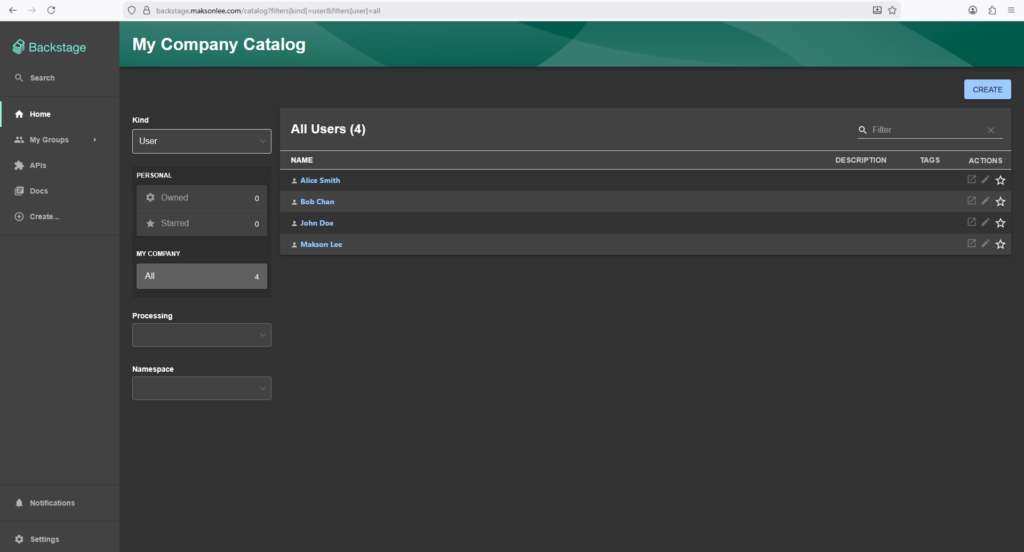
List all users
- Go to My Company Catalog.
- In the Kind dropdown (top-left), choose User.
You should see something like:
List all groups
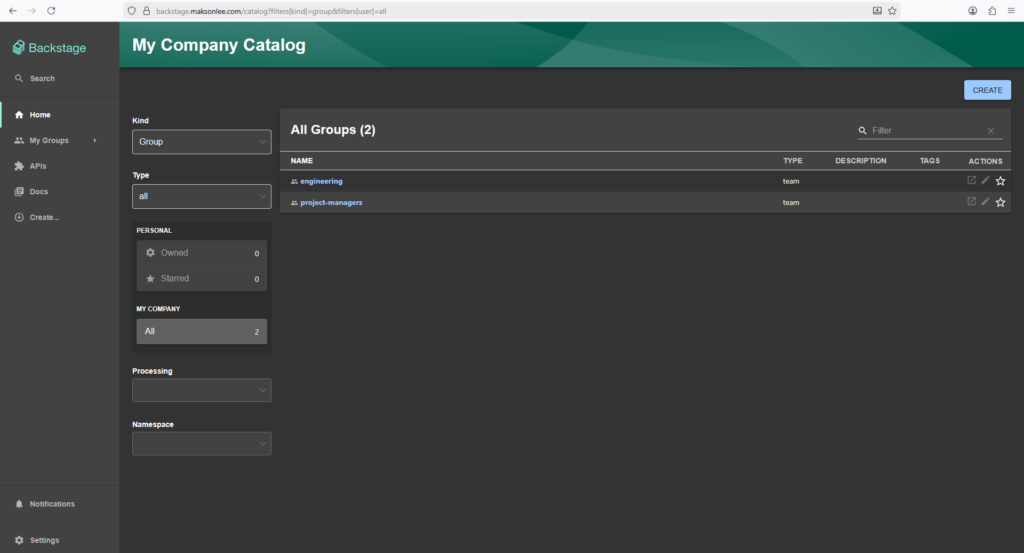
- Go to My Company Catalog.
- In the Kind dropdown (top-left), choose Group.
You should see: