
Category
AI & Desktop Tools
TL;DR
PowerShell 7 installs next to Windows PowerShell 5.1. Use pwsh for 7.x and powershell for 5.1. Fastest install:
winget install --id Microsoft.PowerShell --source wingetWhat you’ll get
- Windows PowerShell 5.1 remains (
powershell.exe) for legacy scripts. - PowerShell 7 installs as
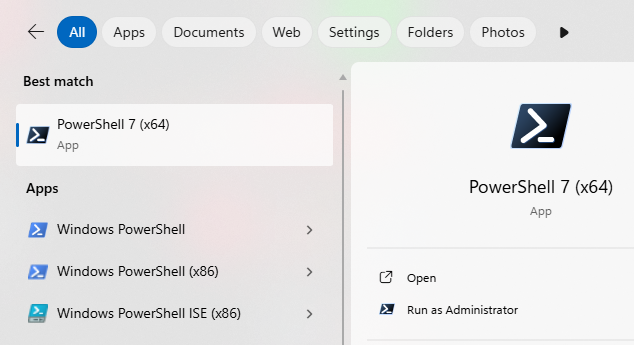
pwsh.exe(modern engine on .NET). - Both show up in Start and Windows Terminal.
Prerequisites
- Windows 11 with internet access
- Run your terminal as Administrator (recommended for machine-wide install)
- Optional: Windows Terminal (better tabs, profiles)
Install
- Open Windows Terminal / PowerShell as Administrator.
- Install
winget install --id Microsoft.PowerShell --source wingetUpdate later
winget upgrade --id Microsoft.PowerShellVerify the installation
pwsh
$PSVersionTable.PSVersion   # expect 7.x
(Get-Command pwsh).Path     # expect C:\Program Files\PowerShell\7\pwsh.exe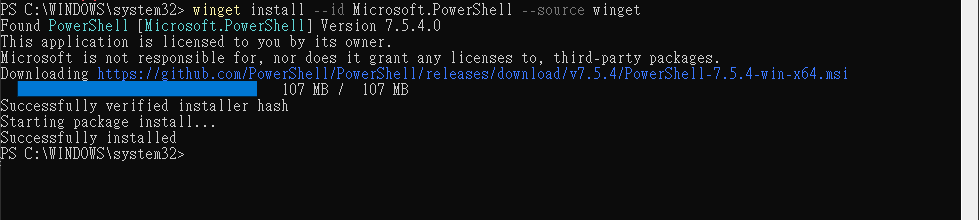
Make PowerShell 7 the default in Windows Terminal
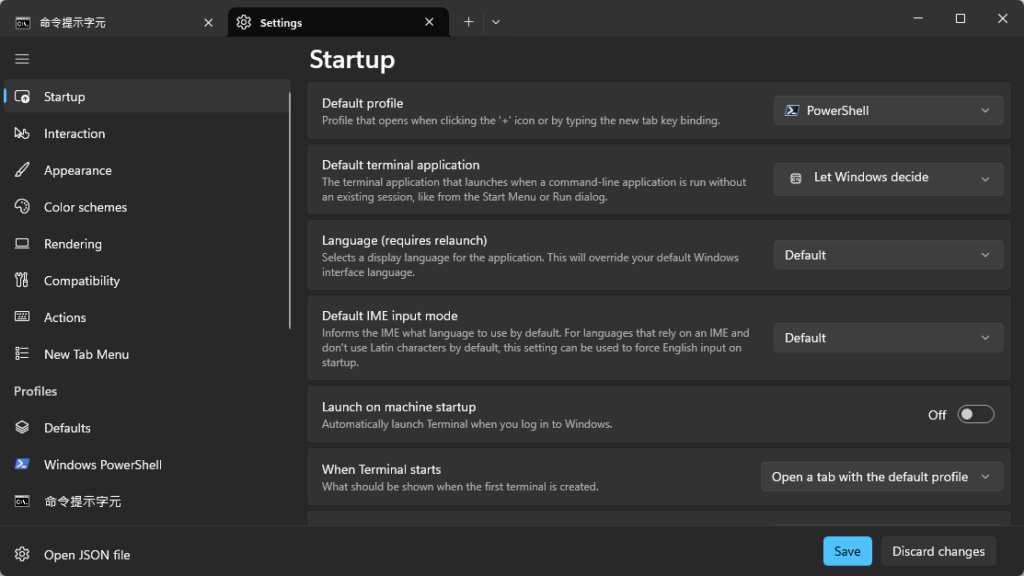
- Open Windows Terminal → Settings.
- Go to Startup.
- Default profile → choose PowerShell (the one that runs
C:\Program Files\PowerShell\7\pwsh.exe). - Click Save, then open a new tab.
Using both versions (side-by-side)
- Windows PowerShell 5.1
- Launch:
powershell - Path:
C:\Windows\System32\WindowsPowerShell\v1.0\powershell.exe
- Launch:
- PowerShell 7
- Launch:
pwsh - Path:
C:\Program Files\PowerShell\7\pwsh.exe
- Launch: