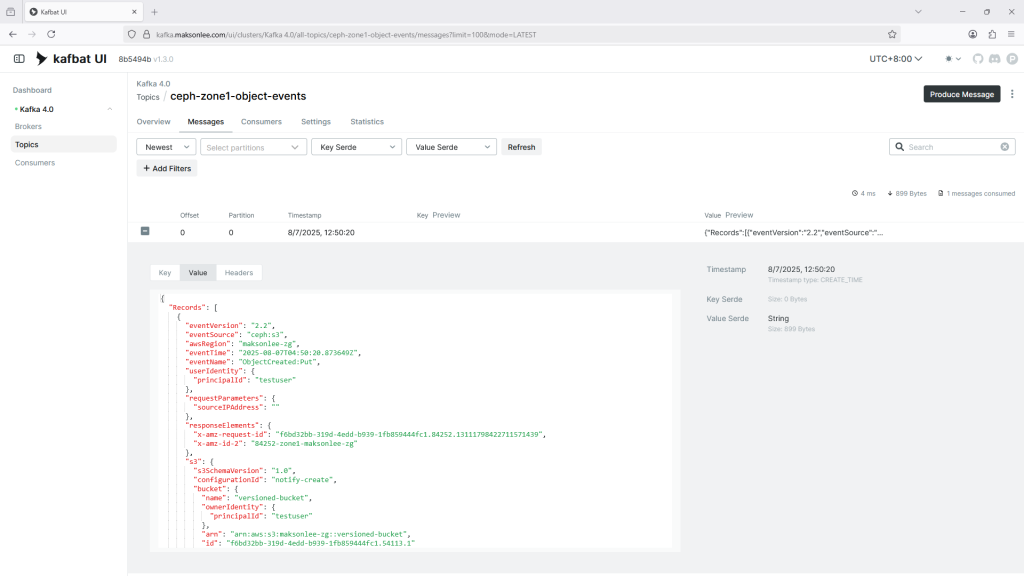
This guide shows you how to configure Ceph RGW to send bucket event notifications to Kafka over HTTPS using SASL/PLAIN authentication. We will use the Kafka REST-like notification mechanism built into RGW and configure it to work through HAProxy TLS termination.
Prerequisites
Before you begin, make sure you already have the following components set up:
- A Working Ceph RGW Deployment
Follow this guide for a local single-node setup:
Ensure the following Ceph RGW setting is added so it trusts the forwarded HTTPS header from HAProxy:
ceph config set client.rgw.zone1.rgw.ceph-zone1.skboxu rgw_trust_forwarded_https true- Kafka 4.0 with SSL + SASL/PLAIN Auth
Follow these two posts to get Kafka running behind HAProxy with username/password authentication:
1. Configure HAProxy for RGW (HTTPS Header Forwarding)
In your HAProxy config for the RGW backend, add the following line:
http-request set-header X-Forwarded-Proto httpsThat’s all you need if you followed the Ceph setup guide. This line ensures RGW knows the request was originally HTTPS.
2. Create RGW Topic Targeting Kafka
Create the RGW PubSub topic that pushes notifications to your Kafka endpoint.
Save the following as create_topic.py:
import datetime
import requests
from urllib.parse import urlencode
from botocore.auth import SigV4Auth
from botocore.awsrequest import AWSRequest
from botocore.credentials import Credentials

# --- CONFIGURATION ---
access_key = "TESTACCESSKEY123456"
secret_key = "TESTSECRETKEY1234567890"
region = "us-east-1"
service = "s3"
host = "ceph-zone1.maksonlee.com"
url = f"https://{host}/"

# --- Kafka Topic Attributes (as form fields) ---
form_data = {
    "Action": "CreateTopic",
    "Name": "ceph-zone1-object-events",
    "Attributes.entry.1.key": "push-endpoint",
    "Attributes.entry.1.value": "kafka://user1:password1@kafka.maksonlee.com:9093",
    "Attributes.entry.2.key": "use-ssl",
    "Attributes.entry.2.value": "true",
    "Attributes.entry.3.key": "kafka-ack-level",
    "Attributes.entry.3.value": "broker",
    "Attributes.entry.4.key": "persistent",
    "Attributes.entry.4.value": "false",
    "Attributes.entry.5.key": "mechanism",
    "Attributes.entry.5.value": "PLAIN"
}

encoded_form = urlencode(form_data)
credentials = Credentials(access_key, secret_key)
headers = {
    "Content-Type": "application/x-www-form-urlencoded",
    "Host": host
}
aws_request = AWSRequest(method="POST", url=url, data=encoded_form, headers=headers)
SigV4Auth(credentials, service, region).add_auth(aws_request)

req = requests.Request(
    method="POST",
    url=url,
    headers=dict(aws_request.headers),
    data=encoded_form
)
prepared = req.prepare()
session = requests.Session()
response = session.send(prepared, verify=True)

print("Status:", response.status_code)
print("Response:", response.text)Note: We use SigV4Auth to sign the request. Avoid crafting the signature manually, incorrect signatures often lead to vague InvalidArgument errors.
3. Attach the Notification to a Bucket
Now that the topic is created, you need to bind it to a bucket and specify which events to trigger it.
Save the following as create_notification.py:
import hashlib
import requests
from botocore.auth import SigV4Auth
from botocore.awsrequest import AWSRequest
from botocore.credentials import Credentials

# --- CONFIGURATION ---
access_key = "TESTACCESSKEY123456"
secret_key = "TESTSECRETKEY1234567890"
region = "us-east-1"
service = "s3"
bucket = "versioned-bucket"
host = "ceph-zone1.maksonlee.com"
url = f"https://{host}/{bucket}?notification"

# === XML PAYLOAD ===
xml_string = """<?xml version="1.0" encoding="UTF-8"?>
<NotificationConfiguration xmlns="http://s3.amazonaws.com/doc/2006-03-01/">
  <TopicConfiguration>
    <Id>notify-all-events</Id>
    <Topic>arn:aws:sns:maksonlee-zg::ceph-zone1-object-events</Topic>
    <Event>s3:ObjectCreated:*</Event>
    <Event>s3:ObjectRemoved:Delete</Event>
    <Event>s3:ObjectRemoved:DeleteMarkerCreated</Event>
    <Event>s3:ObjectLifecycle:Expiration:Current</Event>
    <Event>s3:ObjectLifecycle:Expiration:NonCurrent</Event>
    <Event>s3:ObjectLifecycle:Expiration:DeleteMarker</Event>
    <Event>s3:ObjectLifecycle:Transition:Current</Event>
    <Event>s3:ObjectLifecycle:Transition:NonCurrent</Event>
  </TopicConfiguration>
</NotificationConfiguration>
"""

xml_body = xml_string.encode("utf-8")
payload_hash = hashlib.sha256(xml_body).hexdigest()

headers = {
    "Content-Type": "application/xml",
    "Host": host,
    "x-amz-content-sha256": payload_hash,
}

credentials = Credentials(access_key, secret_key)
aws_request = AWSRequest(method="PUT", url=url, data=xml_body, headers=headers)
SigV4Auth(credentials, service, region).add_auth(aws_request)

req = requests.Request(
    method=aws_request.method,
    url=aws_request.url,
    data=xml_body,
    headers=dict(aws_request.headers)
)
prepared = req.prepare()

session = requests.Session()
response = session.send(prepared, verify=True)

print("Status:", response.status_code)
print("Response:", response.text)This script binds all major S3-compatible events to your topic.
Verify Setup
You can verify if the notification is configured using:
radosgw-admin notification list --bucket=versioned-bucketExpected output:
{
    "notifications": [
        {
            "TopicArn": "arn:aws:sns:maksonlee-zg::ceph-zone1-object-events",
            "Id": "notify-all-events",
            "Events": [
                "s3:ObjectCreated:*",
                "s3:ObjectRemoved:Delete",
                "s3:ObjectRemoved:DeleteMarkerCreated",
                "s3:ObjectLifecycle:Expiration:Current",
                "s3:ObjectLifecycle:Expiration:NonCurrent",
                "s3:ObjectLifecycle:Expiration:DeleteMarker",
                "s3:ObjectLifecycle:Transition:Current",
                "s3:ObjectLifecycle:Transition:NonCurrent"
            ],
            "Filter": {
                "S3Key": {},
                "S3Metadata": {},
                "S3Tags": {}
            }
        }
    ]
}Then upload a file to the bucket:
aws --endpoint-url https://ceph-zone1.maksonlee.com s3 cp file.txt s3://versioned-bucket/file.txtAnd check Kafka:
You should see a message published to the topic ceph-zone1-object-events in your Kafka UI or consumer.